
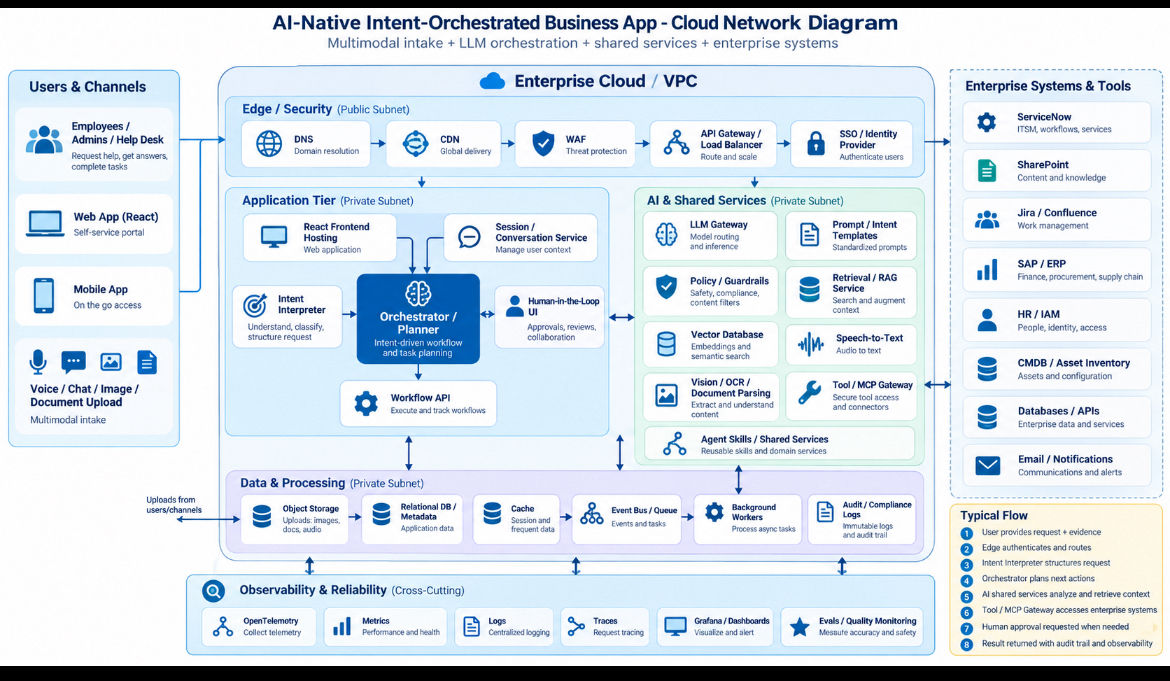
8 AI-Native Application Reference Patterns to Watch

8 AI-Native Application Reference Patterns to Watch
AI application development is moving fast.
Too fast, in fact, to pretend that anybody has everything figured out.
We are still in the Learn → Teach → Master stage of this shift. We are learning which application architectures work, teaching what we see working, and gradually moving toward mastery through repetition, evidence, and real production experience.
That is why I prefer the term:
AI-Native Application Reference Patterns
Not “best practices.”
A best practice sounds settled.
A reference pattern is different. It is a reusable architectural idea that appears useful across multiple AI-native applications and can help engineers think about how to structure the next system they build.
These patterns are not mutually exclusive.
In fact, some of the most interesting applications will combine several of them.
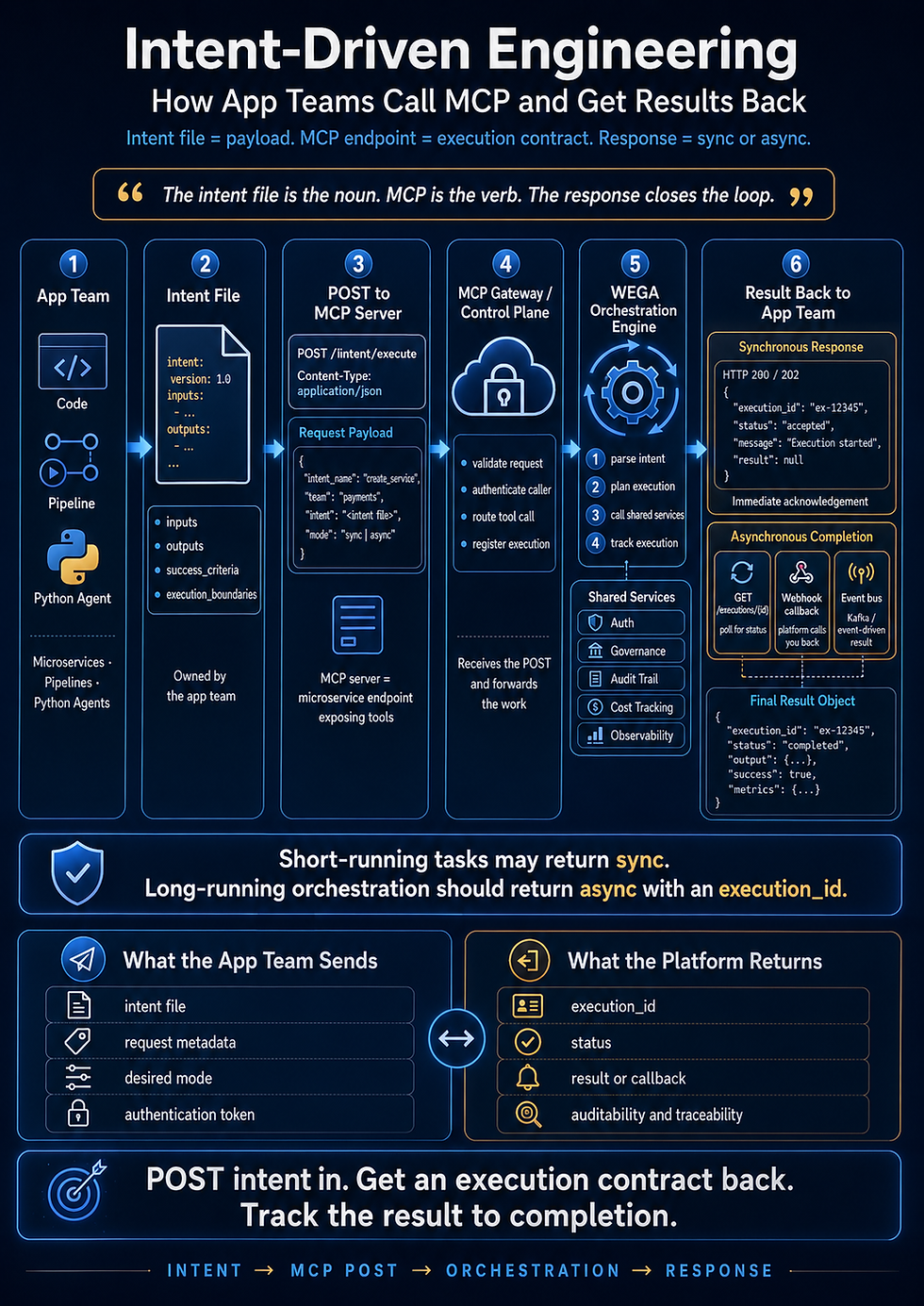
The larger engineering model is still Intent-Driven Engineering:
Intent → Context → Pattern Selection → Execution → Output → Success Criteria → Evaluation → Refinement
The reference patterns sit inside that model.
Here are eight worth watching.
1. Intent-Driven Application
What it is
The user tells the application what they are trying to accomplish, rather than navigating a rigid sequence of screens to tell the software exactly how to accomplish it.
The input might be:
natural language
voice
an image
a screenshot
a document
structured data
or some combination of these
The application interprets the desired outcome and determines what workflow, services, data, and actions are required.
Example
Instead of an employee navigating:
IT Portal → Hardware → Laptop → Replacement → Form → Submit
the employee might say:
My laptop battery only lasts about 30 minutes now. I travel next week. Can you get this fixed before then?
The application determines the employee, device, warranty status, replacement policy, inventory, approval requirements, and next actions.
Why use it
Because users should not have to understand the internal architecture of the company in order to get work done.
The human provides the intent.
The system determines the procedure.
Benefits
Less navigation
Fewer forms
Faster task completion
Better user experience
More adaptive workflows
Natural multimodal interaction
This may become one of the defining patterns of future enterprise applications.
2. Agentic Application
What it is
An Agentic Application gives AI controlled access to tools and allows it to take multiple steps toward an objective.
Instead of simply answering a question, the application can:
observe → reason → choose an action → use a tool → inspect the result → continue
Tools may include:
APIs
databases
enterprise systems
search
MCP servers
internal services
workflow engines
Example
A procurement application receives:
We need 20 laptops for the new engineering team by October 15.
The agent could potentially:
check approved hardware standards
check inventory
identify vendors
retrieve pricing
determine budget rules
prepare a purchase request
route it for approval
Why use it
Use an agentic pattern when the desired outcome requires multiple decisions or tool calls that cannot be completely predetermined ahead of time.
Benefits
Handles variable workflows
Reduces manual coordination
Connects reasoning to action
Adapts when intermediate results change the next step
Allows software to orchestrate other software
The important engineering challenge is not merely giving the agent tools.
It is deciding which tools it is allowed to use, under what conditions, with what approvals, and when it must stop.
3. Situational Application
What it is
A Situational Application is created or adapted for a specific situation instead of being designed as a permanent, generalized enterprise system.
AI makes these applications increasingly practical because software can be generated quickly around a temporary business need.
Example
A company has a major product recall.
Instead of spending six months creating a permanent recall management platform, a situational application could rapidly provide:
case intake
document processing
customer communication
dashboards
workflow
reporting
escalation
When the situation ends, the application may be retired.
Why use it
Not every problem deserves a five-year application architecture.
Sometimes the correct lifespan of software is:
three days, three weeks, or three months.
Benefits
Faster delivery
Lower cost
Highly focused functionality
Reduced long-term maintenance
Enables experimentation
This pattern changes an old assumption in enterprise architecture:
software does not always need to be permanent to be valuable.
4. Research and Reasoning Application
What it is
This application specializes in assembling evidence and reasoning over it before producing an answer or recommendation.
Typical components may include:
search → retrieval → query rewriting → RAG → reranking → reasoning → evaluation
The important distinction is that this is not simply a chatbot retrieving one document.
The system actively builds an evidence set.
Example
An architecture assistant receives:
Why has this service had repeated production failures over the last six months?
The system might retrieve:
incident reports
deployment history
architecture documentation
application logs
code changes
monitoring events
It may discover missing evidence, perform another retrieval, rerank the information, and continue reasoning.
Why use it
Use this pattern when the answer depends on evidence scattered across multiple sources and the application must synthesize that evidence.
Benefits
Better grounded answers
Traceable evidence
Reduced hallucination
Improved enterprise knowledge access
More sophisticated investigation
This pattern will likely become extremely important in architecture, operations, legal research, compliance, finance, cybersecurity, and executive decision support.
5. Workflow Automation Application
What it is
This pattern combines AI reasoning with deterministic workflow automation.
The AI understands the situation.
The workflow engine executes controlled business processes.
That distinction is important.
You may not want an LLM directly deciding every step of payroll processing, account provisioning, or financial approval.
Instead:
AI understands → workflow executes
Example
An employee says:
Sarah starts Monday. Get everything ready for her.
The AI determines that the request means onboarding.
A controlled workflow then executes:
create identity
provision accounts
request laptop
assign software
create building access
notify manager
Why use it
Use this pattern where AI interpretation is valuable but business execution needs reliability, repeatability, and auditability.
Benefits
Combines intelligence with deterministic controls
Easier governance
Better audit trails
Lower operational risk
Reuses existing enterprise automation
This may be one of the safest bridges between today’s enterprise software and tomorrow’s AI-native systems.
6. Human-in-the-Loop Application
What it is
The AI performs as much work as appropriate but intentionally stops when human judgment, authorization, accountability, or missing information is required.
Human involvement becomes part of the architecture rather than an exception.
Example
An AI system prepares a vendor contract change.
It can:
examine the existing contract
compare proposed terms
identify differences
flag unusual clauses
prepare the modification
But before execution:
Legal approval required.
Why use it
Use this pattern whenever the consequence of an incorrect autonomous action is unacceptable or when organizational policy requires human accountability.
Benefits
Safer automation
Clear accountability
Higher user trust
Easier adoption
Allows gradual autonomy
One of the most important AI design questions may become:
Where should the machine stop and the human begin?
7. Generated / Dynamic UI Application
What it is
Traditional applications present screens designed months or years beforehand.
A dynamic application generates the interface needed for the current situation.
Instead of forcing every user through the same interface, the UI adapts to the task.
Example
A user says:
I need to replace this equipment.
The system already knows most of the information.
Rather than displaying a 20-field form, it might generate only:
I found asset #48291.
Reason for replacement?
Damaged
Obsolete
Lost
Other
Then:
Replacement cost is $1,280. Manager approval required.
[Request Approval]
The interface was created because that was what the workflow needed at that moment.
Why use it
Use dynamic UI when the interaction cannot be efficiently represented by one fixed sequence of screens.
Benefits
Fewer unnecessary fields
Better contextual experience
Faster workflows
More personalized interactions
Less application navigation
Future applications may have far fewer permanent screens.
The interface may increasingly become a temporary representation of the current intent.
8. Exception-Driven Application
What it is
Traditional business applications often require humans to supervise normal processing.
An Exception-Driven Application reverses that model.
The machine handles normal operations.
Humans primarily deal with situations the system cannot confidently resolve.
Example
Imagine invoice processing.
Instead of an employee reviewing 2,000 invoices:
the system automatically processes 1,930.
The employee receives 70 exceptions:
missing purchase order
unusual amount
duplicate invoice
policy violation
low confidence extraction
Why use it
Use this pattern when the majority of work follows recognizable rules but a smaller percentage requires judgment.
Benefits
Dramatically reduces repetitive work
Focuses humans on valuable decisions
Improves operational scale
Makes AI confidence actionable
Creates a natural human-in-the-loop boundary
This is a subtle but important change:
people stop operating the process and start managing the exceptions.
These Patterns Will Often Be Combined
The most interesting systems will rarely use only one pattern.
Consider a future enterprise help-desk application.
A user says:
My VPN hasn’t worked since the update last night. Here’s the error message.
That single interaction might invoke:
Intent-Driven Application
to understand what the employee wants.
Research / Reasoning Application
to investigate known incidents and documentation.
Agentic Application
to query device, identity, VPN, and configuration systems.
Workflow Automation Application
to perform an approved repair process.
Generated UI
to ask for one missing piece of information.
Human-in-the-Loop
if elevated access or approval is required.
Exception-Driven Application
if the problem cannot be resolved automatically.
That is not eight different products.
It is one application composed from several reference patterns.
The Architecture Is Beginning to Invert
Traditional enterprise software often looked like:
Human → Screen → Form → Application → Database
AI-native applications increasingly look more like:
Human Intent
↓
Text / Voice / Images / Documents
↓
Intent Interpretation
↓
Context + Enterprise Knowledge
↓
Reasoning / Planning
↓
Agents + Workflows + Shared Services
↓
Enterprise Systems
↓
Human Approval When Needed
↓
Outcome
That is an important architectural shift.
The user no longer needs to orchestrate all the software.
The software increasingly orchestrates itself around the user’s intent.
These Are Reference Patterns, Not Rules
This list will change.
Some patterns will merge.
Others will disappear.
New ones will emerge.
And that is exactly what should happen.
We are early.
At Intent-Driven Engineering, the objective right now is not to declare that we have mastered AI-native application architecture.
The objective is to:
Learn what is happening.
Build enough systems to see what repeats.
Teach the patterns that appear useful.
Measure the results.
Refine the patterns.
And eventually:
Master the ones that consistently work.
That is how engineering disciplines develop.
These eight patterns are simply a snapshot of where AI-native application architecture appears to be heading.
Keep watching them.
More importantly, start building with them.
Intent-Driven Engineering
Learn. Teach. Master.
Intent → Context → Pattern → Execution → Evidence → Improvement
This gives you the article as an emerging-patterns piece, rather than positioning us like Fowler and saying, “These are the established patterns.” It also gives you eight clean concepts you can later turn into eight individual videos, eight diagrams, or eight deeper articles.
Comments