
Enterprise Claude Code Starter Kit
- Mark Kendall
- 2 days ago
- 3 min read

Enterprise Claude Code Starter Kit
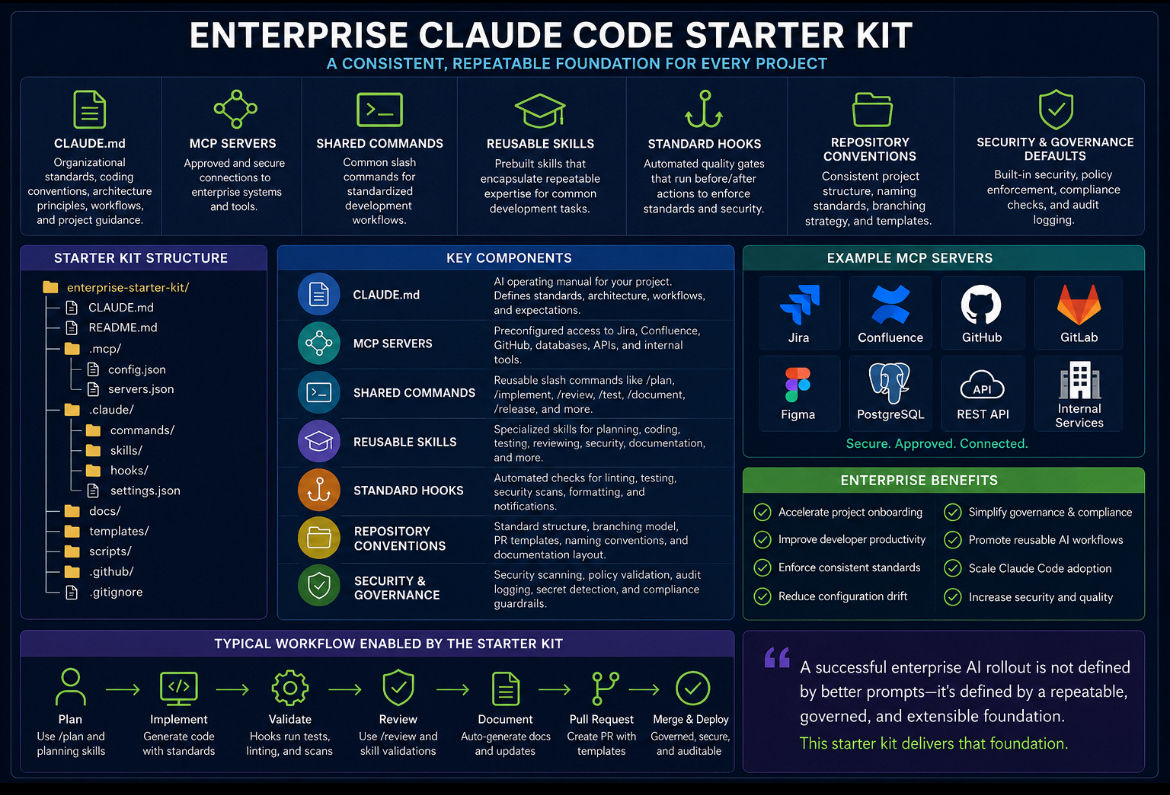
Every successful enterprise AI rollout starts with consistency. An Enterprise Claude Code Starter Kit provides every repository with the same proven foundation, allowing developers to focus on delivering business value instead of configuring tooling.
Directory Structure
enterprise-starter-kit/
│
├── CLAUDE.md
├── README.md
├── .mcp/
│ ├── config.json
│ └── servers.json
│
├── .claude/
│ ├── commands/
│ │ ├── plan.md
│ │ ├── implement.md
│ │ ├── review.md
│ │ ├── document.md
│ │ └── release.md
│ │
│ ├── skills/
│ │ ├── feature-planner/
│ │ ├── unit-test-generator/
│ │ ├── security-review/
│ │ ├── documentation-writer/
│ │ ├── api-designer/
│ │ └── pull-request-generator/
│ │
│ ├── hooks/
│ │ ├── pre-tool-use.sh
│ │ ├── post-tool-use.sh
│ │ ├── pre-commit.sh
│ │ └── notification.sh
│ │
│ └── settings.json
│
├── docs/
│ ├── architecture.md
│ ├── coding-standards.md
│ ├── development-workflow.md
│ ├── security.md
│ └── onboarding.md
│
├── templates/
│ ├── feature.md
│ ├── user-story.md
│ ├── pull-request.md
│ └── design-review.md
│
├── scripts/
│ ├── bootstrap.sh
│ ├── validate.sh
│ ├── format.sh
│ └── test.sh
│
└── .github/
├── workflows/
└── pull_request_template.md
What Every Repository Receives
The project’s AI operating manual.
Includes:
Organizational standards
Coding conventions
Architecture principles
Repository layout
Technology stack
Preferred workflows
Documentation expectations
Definition of Done
This file tells Claude how your organization builds software.
✅ Approved MCP Server Configuration
Secure access to enterprise systems.
Examples:
Jira
Confluence
GitHub
GitLab
Figma
Databases
REST APIs
File systems
Internal services
Developers immediately have access to approved enterprise tools without manual configuration.
✅ Shared Slash Commands
Reusable commands that standardize common workflows.
Examples:
/plan
/implement
/review
/test
/document
/refactor
/release
/security
Every developer uses the same commands across every repository.
✅ Reusable Skills
Enterprise-approved AI specialists.
Examples:
Feature Planner
Code Reviewer
Test Generator
Security Auditor
Documentation Writer
API Designer
Database Expert
Performance Optimizer
Skills encapsulate repeatable expertise that every team can leverage.
✅ Standard Hooks
Automated quality gates that execute during development.
Examples:
Before Tool Use
Validate repository state
Verify branch
Check prerequisites
After Tool Use
Run formatter
Execute linters
Validate generated code
Before Commit
Run unit tests
Execute security scans
Check coding standards
Notifications
Build status
Review reminders
Deployment events
Hooks enforce engineering standards automatically rather than relying on manual processes.
✅ Repository Conventions
Every project follows the same structure.
Examples:
Directory organization
Naming standards
Branch strategy
Feature workflow
Pull request templates
Documentation layout
Release process
Consistency reduces onboarding time and improves maintainability.
✅ Security and Governance Defaults
Security is built into the starter kit from day one.
Includes:
Secret detection
Dependency scanning
Policy validation
Approved tool access
Branch protection guidance
Pull request reviews
Audit logging
Compliance checks
Governance becomes part of the development workflow instead of an afterthought.
Enterprise Benefits
Using a standardized starter kit enables organizations to:
Accelerate new project onboarding
Improve developer productivity
Enforce consistent engineering practices
Reduce configuration drift
Simplify governance and compliance
Promote reusable AI workflows
Scale Claude Code adoption across teams
Instead of every developer inventing a different way to work, the organization provides a common operating model that can evolve over time.
A successful enterprise AI rollout is not defined by better prompts—it’s defined by a repeatable, governed, and extensible foundation. An Enterprise Claude Code Starter Kit delivers that foundation from the very first commit.
Comments