
The Real Work Starts After the Screen Is Built: How to Connect a Complex React Wizard Form to REST APIs
- Mark Kendall
- 4 hours ago
- 11 min read

The Real Work Starts After the Screen Is Built: How to Connect a Complex React Wizard Form to REST APIs
A lot of teams think the hard part is getting the screen built.
That is only partly true.
With AI tools like Claude Code, we can move much faster from Figma screens, Jira stories, acceptance criteria, and mock data into a working React form. But once the form is on the screen, the real enterprise work begins.
Now the form has to connect to real APIs.
Now the data has to match.
Now the business rules have to survive the integration.
Now the backend has to support what the UI is asking for.
And this is where many teams slow down.
Not because they cannot write React.
Not because they cannot write APIs.
But because they do not have a clear integration pattern.
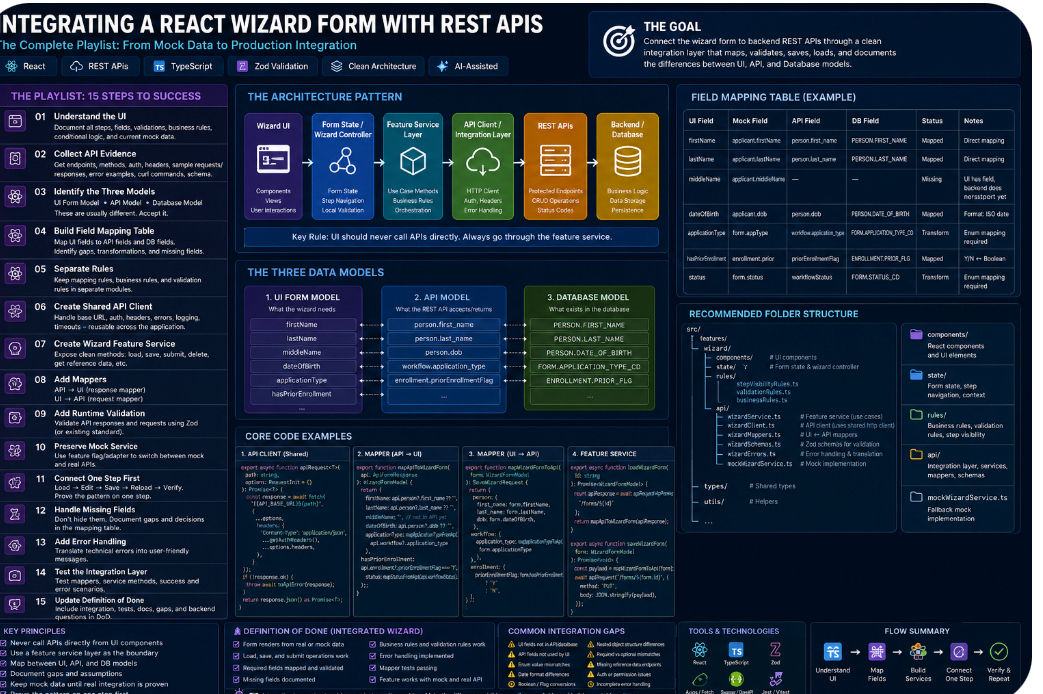
This article lays out the practical pattern teams should follow when connecting a complex wizard-based React form to protected REST APIs.
The Scenario
Imagine a multi-step React wizard form.
It has:
Multiple screens
Lots of questions
Conditional fields
Business rules
Validation rules
Figma designs
Jira story details
Acceptance criteria
Mock data
Backend REST APIs
A database schema
Some fields that exist in the UI but not yet in the database
Some API fields that do not perfectly match the form
That is not just a UI task.
That is an integration task.
The goal is not simply:
Connect the form to the API.
The better goal is:
Connect the wizard form to the backend REST APIs through a clean integration layer that maps, validates, saves, loads, and documents the differences between the UI model and the API model.
That is the difference between hacking it together and building a repeatable enterprise pattern.
First Principle: Do Not Put API Calls Directly Inside the Form Components
This is the first rule.
Do not scatter fetch() or axios calls across every React component.
That creates a mess quickly.
The UI should not know every detail about:
API URLs
Headers
Auth tokens
Request payload shape
Response payload shape
Backend field names
Database field names
Retry logic
Error translation
API gaps
Missing fields
The React component should mostly care about the form experience.
It should know:
What data to display
What fields are required
What step the user is on
What happens when the user clicks Next, Back, Save, or Submit
The integration details should sit behind a service layer.
The Recommended Pattern
For a complex wizard form, the flow should look like this:
Wizard UI
↓
Form State / Wizard Controller
↓
Feature Service Layer
↓
API Client / Integration Layer
↓
Protected REST APIs
↓
Backend / Database
This does not always mean server-side middleware.
Sometimes people hear the word “middleware” and think it must be a Node service, .NET service, API gateway, or backend proxy.
Maybe.
But in this case, what we really need first is a frontend feature integration layer.
That layer lives in the React application and protects the wizard from backend complexity.
A good folder structure might look like this:
wizard/
components/
state/
rules/
api/
wizardService.ts
wizardClient.ts
wizardSchemas.ts
wizardMappers.ts
wizardErrors.ts
mockWizardService.ts
The names do not matter as much as the separation of responsibility.
The important thing is this:
The UI does not directly talk to the raw API.
The UI talks to a feature service.
The feature service talks to the API client.
The mappers translate between the UI model and the API model.
The schemas validate the data.
The rules handle business behavior.
That is the pattern.
Is This Per API or Shared?
Some parts should be shared.
Some parts should be feature-specific.
A shared API client can handle common concerns like:
Base URL
Auth headers
Token handling
Standard request wrapper
Standard error handling
JSON parsing
Logging
Correlation IDs
Timeout behavior
That can be reused across the whole application.
But the wizard-specific pieces should stay close to the wizard feature.
Those include:
Wizard form model
Wizard request payloads
Wizard response payloads
Wizard field mappings
Wizard validation rules
Wizard step logic
Wizard-specific error messages
Wizard mock service
So the pattern is:
Shared API Infrastructure
Used by many features
Feature Integration Layer
Specific to this wizard form
Do not put every wizard rule into a global API client.
Do not put every API detail inside the React component.
Keep the boundary clean.
The Playlist: How to Do the Integration
Here is the step-by-step playlist the team should follow.
Step 1: Confirm What the UI Already Has
Before touching the API, inspect the current wizard.
Document:
All wizard steps
All form fields
Required fields
Optional fields
Conditional fields
Validation rules
Business rules
Current mock data shape
Current submit behavior
Current save behavior
Current navigation behavior
The team should be able to answer:
What is the UI asking for?
This sounds basic, but many integrations fail because nobody has written down the actual UI data model.
Step 2: Collect the Backend API Evidence
Do not start coding from rumors.
Ask the backend team for concrete API evidence.
You need:
Endpoint URLs
HTTP methods
Auth requirements
Required headers
Query parameters
Route parameters
Request payload examples
Response payload examples
Error response examples
Status codes
OpenAPI/Swagger documentation if available
Working curl commands
Database schema
Known missing fields
Known fields that are not final
The curl commands are especially valuable.
A working curl command proves that the endpoint can be called.
Example:
curl -X POST "https://api.company.com/forms" \
-H "Authorization: Bearer <token>" \
-H "Content-Type: application/json" \
-d '{ ... }'
Once you have working examples, Claude Code or any engineer can reason much more accurately.
Step 3: Identify the Three Data Models
There are usually three different models involved.
1. UI Form Model
This is what the wizard needs.
It may look clean and user-friendly.
Example:
firstName
lastName
middleName
dateOfBirth
applicationType
hasPriorEnrollment
2. API Model
This is what the REST API accepts and returns.
It may use different names.
Example:
person.first_name
person.last_name
person.dob
workflow.application_type
3. Database Model
This is what actually exists behind the API.
Example:
PERSON.FIRST_NAME
PERSON.LAST_NAME
PERSON.DATE_OF_BIRTH
FORM.APPLICATION_TYPE_CD
These three models are not automatically the same.
Do not pretend they are.
The integration layer exists because these models are different.
Step 4: Build the Field Mapping Table
This is one of the most important artifacts.
Create a table like this:
UI Field | Mock Field | API Field | DB Field | Status | Notes
Example:
firstName | applicant.firstName | person.first_name | PERSON.FIRST_NAME | Mapped | Direct mapping
middleName | applicant.middleName | — | — | Missing | UI has field, backend does not support it yet
status | form.status | workflowStatus | FORM.STATUS_CD | Transform | Enum conversion needed
hasPriorEnrollment | enrollment.prior | priorEnrollmentFlag | ENROLLMENT.PRIOR_FLG | Mapped | Boolean conversion needed
This table becomes the truth.
It shows what is mapped.
It shows what is missing.
It shows what needs transformation.
It shows what requires backend clarification.
Without this table, the team is guessing.
With this table, the team can move.
Step 5: Separate Mapping Rules from Business Rules
This is critical.
A mapping rule is not the same as a business rule.
A mapping rule says:
API field X becomes UI field Y.
A business rule says:
If the user answers Yes to question A, show question B.
A validation rule says:
Question B is required when question A is Yes.
These should not all be mixed together inside React JSX.
A better structure is:
wizard/
rules/
stepVisibilityRules.ts
validationRules.ts
businessRules.ts
api/
wizardMappers.ts
This gives the team a clean place to reason.
It also gives Claude Code a better structure to modify safely.
Step 6: Create the Shared API Client
Most applications should have a shared API client.
This handles common technical concerns.
Example responsibilities:
Add auth headers
Set content type
Use the correct base URL
Parse JSON
Handle HTTP errors
Normalize error messages
Support environment-specific URLs
Add logging if needed
Example shape:
export async function apiRequest<T>(
path: string,
options: RequestInit = {}
): Promise<T> {
const response = await fetch(`${API_BASE_URL}${path}`, {
...options,
headers: {
"Content-Type": "application/json",
...getAuthHeaders(),
...options.headers,
},
});
if (!response.ok) {
throw await toApiError(response);
}
return response.json() as Promise<T>;
}
This is shared infrastructure.
The wizard should use it, but the wizard should not own all of it.
Step 7: Create the Wizard Feature Service
The wizard feature service is where the form gets clean operations.
For example:
loadWizardForm(id)
saveWizardStep(stepId, formData)
submitWizardForm(formData)
deleteWizardDraft(id)
getReferenceData()
The React form should call these methods.
It should not manually construct raw API payloads.
Example:
export async function loadWizardForm(id: string): Promise<WizardFormModel> {
const apiResponse = await apiRequest<ApiFormResponse>(`/forms/${id}`);
return mapApiToWizardForm(apiResponse);
}
export async function saveWizardForm(form: WizardFormModel): Promise<void> {
const payload = mapWizardFormToApi(form);
await apiRequest(`/forms/${form.id}`, {
method: "PUT",
body: JSON.stringify(payload),
});
}
That gives the UI a clean contract.
The UI says:
Load the wizard.
The service handles:
How to call the API, map the response, handle errors, and return the right form model.
Step 8: Add Mappers
The mappers are where the translation happens.
One mapper goes from API response to UI form model.
Another goes from UI form model to API request payload.
Example:
export function mapApiToWizardForm(api: ApiFormResponse): WizardFormModel {
return {
firstName: api.person?.first_name ?? "",
lastName: api.person?.last_name ?? "",
dateOfBirth: api.person?.dob ?? "",
applicationType: mapApplicationTypeFromApi(api.workflow?.application_type),
hasPriorEnrollment: api.enrollment?.priorEnrollmentFlag === "Y",
};
}
export function mapWizardFormToApi(form: WizardFormModel): SaveWizardRequest {
return {
person: {
first_name: form.firstName,
last_name: form.lastName,
dob: form.dateOfBirth,
},
workflow: {
application_type: mapApplicationTypeToApi(form.applicationType),
},
enrollment: {
priorEnrollmentFlag: form.hasPriorEnrollment ? "Y" : "N",
},
};
}
This is where a lot of teams skip structure.
Do not skip this.
Step 9: Add Runtime Validation Where Appropriate
TypeScript helps during development.
Runtime validation helps when the API sends unexpected data.
If the repo already uses something like Zod, Yup, AJV, or another schema library, use the existing pattern.
Example:
const ApiFormResponseSchema = z.object({
id: z.string(),
person: z.object({
first_name: z.string().optional(),
last_name: z.string().optional(),
dob: z.string().optional(),
}).optional(),
});
Then validate API responses before mapping them.
This helps catch contract drift early.
If the backend changes the payload, the frontend should detect it clearly.
Step 10: Preserve the Mock Service as a Fallback
Do not throw away mock data too early.
The backend may be incomplete.
Auth may not work locally.
Some fields may be missing.
Some endpoints may not be ready.
The team still needs to keep building and testing the UI.
Create a real service and a mock service behind the same interface.
Example:
export const wizardService = USE_MOCK_API
? mockWizardService
: realWizardService;
This lets the team switch between mock and real integration.
That is how you protect velocity.
Step 11: Connect One Wizard Step First
Do not connect the entire wizard at once.
Pick one step.
Make that step work end to end.
The first integration goal should be:
Load data
Populate the form
Edit fields
Save
Reload
Confirm data persisted
Once one step works, the pattern can be repeated.
That is where Claude Code becomes powerful.
The first step teaches the repo the pattern.
The remaining steps become controlled repetition.
Step 12: Handle Missing Fields Explicitly
Some fields in the Figma screen may not exist in the API.
Some fields in the API may not exist in the UI.
Some fields may exist but use different names or formats.
Do not hide this.
Document it.
Use the mapping table.
Use comments carefully.
Use an integration gap report.
Example:
Field: middleName
UI: Present
API: Missing
Database: Missing
Current Handling: Stored only in local form state
Backend Question: Should this be added to the API contract?
Do not invent backend fields.
Do not silently drop form fields without telling the team.
Do not fake persistence.
If a field is not supported, make that visible.
Step 13: Add Error Handling That Users Can Understand
API errors should not leak raw technical messages into the UI.
The integration layer should translate errors into useful messages.
Examples:
401 Unauthorized → Your session has expired. Please sign in again.
403 Forbidden → You do not have permission to update this form.
404 Not Found → This form could not be found.
409 Conflict → This form was updated by someone else. Please reload.
422 Validation Error → Some fields need correction before saving.
500 Server Error → Something went wrong while saving. Please try again.
This belongs in the service/error layer, not scattered across every form field.
Step 14: Add Tests for the Integration Layer
At minimum, test the mappers.
The mapper tests are extremely valuable because they prove the field translation.
Test:
API response to UI form model
UI form model to API request payload
Missing optional fields
Enum transformations
Boolean transformations
Date transformations
Validation error handling
Example:
Given API response with priorEnrollmentFlag = "Y"
When mapped to the wizard form
Then hasPriorEnrollment should be true
These tests are simple, fast, and highly valuable.
Step 15: Update the Definition of Done
For integrated wizard forms, “done” cannot mean the screen renders.
The definition of done should include:
Form renders from real or mock data
One or more steps load from API
Save operation works
Submit operation works if in scope
Required API fields are mapped
Missing backend fields are documented
Business rules still work
Validation still works
Error messages are handled
Mapper tests are passing
Feature can still run with mock data
Field mapping table is updated
Backend questions are documented
That is a real definition of done.
The Claude Code Intent for This Work
Here is the kind of intent file the team should use:
# Intent: Integrate Wizard Form with Backend REST APIs
## Goal
Connect the existing React wizard form to the backend REST APIs through a clean feature integration layer.
Preserve the existing mock data as a fallback while adding real API integration.
## Context
The wizard form was created from Figma screens, Jira story details, acceptance criteria, and mock data.
The backend is API-first and will provide protected REST endpoints for CRUD operations.
Some fields in the UI may not exist in the API or database yet. Some API/database fields may not map perfectly to the UI.
## Required Inputs
Use the following materials:
- Existing React wizard form
- Figma screens
- Jira story
- Acceptance criteria
- Current mock data
- API endpoint documentation
- Sample request payloads
- Sample response payloads
- Error response examples
- Database schema
- Auth instructions
- Known missing fields
## Architecture
Use this flow:
Wizard UI
→ Wizard form state/controller
→ Wizard feature service
→ Shared API client/integration layer
→ Protected REST APIs
Do not call APIs directly from React components.
## Tasks
1. Inspect the repo and find existing API patterns.
2. Find how auth headers and API base URLs are handled.
3. Identify the current wizard form model.
4. Identify the current mock data shape.
5. Identify the provided API request and response shapes.
6. Create a field mapping table:
- UI Field
- Mock Field
- API Field
- DB Field
- Status
- Notes
7. Identify unmapped fields.
8. Identify fields requiring transformation.
9. Create or reuse a shared API client.
10. Create a wizard feature service.
11. Create API request/response types.
12. Create mappers between API and UI models.
13. Add runtime schema validation if the repo already uses a validation library.
14. Preserve mock service behavior through a feature flag or adapter.
15. Connect one wizard step first.
16. Verify load, edit, save, and reload.
17. Add tests for mapper logic.
18. Document assumptions, API gaps, and backend questions.
## Rules
- Do not invent backend fields.
- Do not silently drop UI fields.
- Do not put raw API calls inside React components.
- Do not remove mock data until real API integration is verified.
- Do not connect the entire wizard at once.
- Start with one step and prove the pattern.
- Keep business rules separate from data mapping rules.
- Keep validation rules separate from API mapping rules.
## Final Output
When complete, provide:
1. Files changed
2. Integration architecture summary
3. Field mapping table
4. API gaps
5. Missing backend fields
6. Assumptions made
7. How to run locally
8. How to switch between mock and real API
9. How to test the integration
10. Remaining backend questions
The Pattern the Team Should Repeat
Once the first wizard step works, repeat the same pattern for the remaining steps.
The repeatable pattern is:
Understand the UI fields
Compare against mock data
Compare against API contract
Compare against database schema
Create or update mapping table
Add mapper logic
Add service method
Add validation
Wire the UI step
Test load/save
Document gaps
Move to the next step
That is the playlist.
Final Thought
The problem is usually not that 60 engineers cannot build a form.
The problem is that the team has not turned the integration into a clear engineering pattern.
A complex enterprise form is not just a React screen.
It is a contract between product, design, frontend, backend, database, security, and QA.
Claude Code can help move that work much faster, but only if we give it the right structure.
The winning move is not:
Build the form.
The winning move is:
Build the integration pattern once, prove it on one wizard step, and then repeat it safely across the rest of the form.
That is how teams move from slow feature delivery to repeatable AI-assisted engineering.
:::
Comments