

When Claude Leaves the IDE
- Mark Kendall
- 3 days ago
- 11 min read

When Claude Leaves the IDE
A Developer’s Guide to Agentic Loops, Harnesses, Orchestration, Hooks, and Subagents
There is a growing problem in the way agentic development is being explained.
Developers are told that to use Claude effectively, they need to understand:
Agentic loops
Stop reasons
Tool execution
Hooks
Skills
Subagents
Coordinators
Context passing
Session state
Orchestration
Model Context Protocol
Error propagation
Human escalation
Structured handoffs
All of those things matter.
But they do not all matter at the same architectural level.
That distinction is being lost.
Most software developers working with Claude Code inside an integrated development environment are not building an agent platform. They are building features, fixing defects, refactoring code, writing tests, and delivering pull requests.
Claude Code already provides much of the agentic machinery underneath that experience.
The developer works through an intent file, repository guidance, plan review, tool approvals, test evidence, and human judgment.
The agentic harness is already there.
The developer does not need to recreate it.
But once Claude leaves the IDE and becomes part of an application, service, workflow, or enterprise automation platform, the responsibility changes.
Now someone must build the harness.
Now someone must manage the loop.
Now someone must decide which tools Claude may call, how tool results return to the model, when execution stops, when work is delegated, how errors propagate, and when a human must take control.
That is not ordinary feature development.
It is agentic systems engineering.
And it should be treated as a higher architectural layer.
Two Different Ways of Using Claude
The easiest way to understand the difference is to separate Claude usage into two operating models.
Model One: Claude Code inside the IDE
In this model, the developer works inside Visual Studio Code or another supported development environment.
The developer provides:
An intent
Repository context
Scope
Constraints
Acceptance criteria
Required evidence
Approval and review
Claude Code handles much of the underlying execution behavior:
Repository exploration
File reading
Code search
Editing
Command execution
Test execution
Iteration
Tool-result handling
Session management
The developer does not normally write an agentic loop.
The developer does not manually inspect stop_reason.
The developer does not append every tool result back into the conversation history.
The developer is using an existing agentic environment.
Model Two: Claude outside the IDE
In this model, Claude is embedded in a system.
Examples include:
A customer-support agent
A research platform
A document-processing pipeline
An automated code-review service
A deployment-governance agent
A shared enterprise engineering service
A production incident assistant
A financial approval workflow
A multi-agent delivery platform
In these systems, there may be no developer sitting at the keyboard supervising every action.
The system must manage itself within defined limits.
That means the application must take responsibility for the behavior Claude Code previously handled.
This is where loops, stop reasons, hooks, orchestration, subagents, structured errors, and deterministic controls become essential.
The IDE Hides the Harness
A developer using Claude Code sees a relatively simple interaction:
Intent
↓
Claude investigates
↓
Claude proposes or implements
↓
Claude runs tests
↓
Developer reviews
Underneath that experience, more is happening.
Claude may request a tool.
The environment executes the tool.
The result is added back into context.
Claude reasons again.
The loop continues until the work is complete, blocked, denied, or requires further input.
The developer benefits from the loop without having to implement it.
That is an important architectural advantage.
The IDE is not avoiding agentic architecture.
It is packaging agentic architecture into a usable developer experience.
This is why everyday developers should not be forced to think constantly about protocol-level concerns.
Their job is to define good intent and govern the resulting change.
The harness belongs underneath them.
Outside the IDE, Someone Must Own the Loop
When Claude is embedded into an application, the loop is no longer provided automatically.
The application must send the request, inspect Claude’s response, execute requested tools, return the results, and decide whether another iteration is required.
The core lifecycle is:
Application sends request
↓
Claude responds
↓
Application inspects stop_reason
↓
tool_use?
Yes → execute tool → return result → continue
No → end_turn → return final response
The Claude Certified Architect exam guide identifies tool_use and end_turn as the primary control signals for an agentic loop. It also warns against determining completion by parsing assistant text or relying on arbitrary iteration limits as the main stopping mechanism.
This is no longer an intent-file concern.
It is application control logic.
The intent may define the business goal, but the harness determines how the execution cycle operates safely.
What an Agentic Harness Actually Does
An agentic harness is the application layer surrounding the model.
It connects Claude’s reasoning to real systems while controlling what Claude is allowed to do.
A production harness commonly handles:
Model requests and responses
Conversation history
Tool registration
Tool execution
Stop-reason processing
Permissions
Timeouts
Retry behavior
Error classification
Logging
Cost controls
Context trimming
Human escalation
Policy enforcement
Session persistence
Auditability
Final-output validation
Without a harness, Claude may reason well, but it has no reliable production operating environment.
This is why agentic architecture is not just prompt engineering.
The prompt explains the job.
The harness runs the job.
When You Actually Need to Build a Harness
Most development teams should not build a custom harness merely because they can.
A custom harness becomes justified when Claude must operate outside direct IDE supervision.
Persistent automation
The system runs without a developer actively guiding each step.
Examples:
Nightly repository analysis
Automated pull-request review
Production support triage
Scheduled compliance checks
Document-processing queues
Enterprise tool access
Claude must interact with internal services such as:
Jira
ServiceNow
GitHub
Databases
Customer systems
Cloud platforms
Identity platforms
Financial systems
The application must control credentials, permissions, input validation, and audit trails.
Multi-step business workflows
The work requires more than one model response.
For example:
Verify customer
↓
Retrieve account
↓
Investigate issue
↓
Determine policy
↓
Perform action or escalate
The workflow must maintain state and enforce prerequisites.
Deterministic requirements
Certain actions cannot be left to prompt compliance.
Examples include:
Identity verification before refunds
Approval before production deployment
Financial limits
Access-control checks
Regulated data handling
Mandatory human review
Prohibited destructive actions
The guide explicitly distinguishes prompt guidance from programmatic enforcement. When compliance must be guaranteed, hooks and prerequisite gates should enforce the rule outside the model’s discretion.
Multiple specialized workers
The work is too broad for one context or one responsibility.
Examples:
Search agent
Repository-analysis agent
Data-extraction agent
Security-review agent
Synthesis agent
Deployment-validation agent
At that point, orchestration becomes an architectural concern.
Reliability and recovery
The system must recover intelligently when:
A tool times out
A service returns incomplete data
Permissions are denied
One subagent fails
A source is unavailable
Context becomes stale
An operation cannot safely continue
That requires structured error handling and recovery logic.
Orchestration Is Not the Same as Letting Claude Work
Developers often hear “agentic” and assume that any autonomous-looking behavior is orchestration.
It is not.
Claude editing several files inside the IDE is not necessarily a multi-agent architecture.
Claude running tests and correcting failures is not automatically orchestration.
Claude using several tools is not the same as a coordinator managing specialized agents.
True orchestration begins when the system must deliberately manage distinct workers, responsibilities, contexts, and handoffs.
A coordinator may need to:
Analyze the overall request
Decompose the problem
Choose which subagents are necessary
Assign separate scopes
Pass context explicitly
Receive structured results
Handle partial failure
Detect missing coverage
Request additional investigation
Produce a unified final result
The guide describes this as a hub-and-spoke architecture in which the coordinator controls task decomposition, delegation, result aggregation, information routing, and error handling.
That is a system-design responsibility.
It is not something every feature developer needs to implement.
Subagents Should Exist for a Reason
Subagents are useful when work benefits from separation.
They should not be created merely because multi-agent systems sound advanced.
A subagent is justified when one or more of the following is true:
Context isolation
A large exploration task would flood the main context with low-level details.
A subagent can investigate and return only the useful findings.
Specialized tools
A worker should have access only to tools relevant to its role.
For example:
A search agent may access web-search tools.
A repository agent may access code-search tools.
A synthesis agent may receive findings but no write access.
A deployment agent may inspect infrastructure but not modify it.
Independent review
A separate agent can evaluate work without inheriting the reasoning that produced it.
This is especially valuable for:
Code review
Security review
Compliance checks
Architecture validation
Extraction verification
Parallel investigation
Several independent areas can be explored simultaneously.
For example:
Front-end impact
API impact
Database impact
Testing impact
Deployment impact
Failure containment
One worker can fail without terminating the entire workflow.
The coordinator can retry, reroute, accept partial results, or escalate.
The guide emphasizes that subagents operate with isolated context and must receive relevant facts explicitly. They do not automatically inherit the coordinator’s full history or share memory with one another.
That isolation is powerful, but it adds engineering responsibility.
Every handoff must be designed.
Skills Are Reusable Capabilities, Not Mandatory Architecture
Skills are often discussed as though every Claude workflow should be assembled from a large library of them.
That is not necessary.
A skill becomes valuable when a repeatable workflow deserves standardization.
Examples include:
Repository readiness assessment
Pull-request evidence generation
Security review
API-contract validation
Architecture impact analysis
Release preparation
Test-gap analysis
Incident investigation
At the team level, a skill may package common engineering behavior.
At the shared-services level, skills may become reusable organizational capabilities.
But a normal developer should not be required to select and sequence skills for every feature.
That recreates complexity at the wrong layer.
A developer should usually provide the intent and allow the environment to use available capabilities where appropriate.
Skills should be deliberately introduced when:
A process must be repeatable
A specific output is required
Tool access must be restricted
Isolation is useful
Governance requires a standard procedure
The same work is performed across many repositories
The architectural rule remains:
Do not expose complexity to the developer unless the developer must control it.
Hooks Exist Where Prompts Are Not Enough
Hooks are another frequently overgeneralized concept.
A hook is not simply another instruction.
It is a programmatic interception point.
A hook may inspect or transform activity before or after a tool executes.
Examples include:
Blocking refunds above a threshold
Preventing production deployment without approval
Rejecting destructive database commands
Removing sensitive data from tool results
Normalizing timestamps
Enforcing required identifiers
Redirecting a prohibited action to a human workflow
Prompts can request that Claude follow a rule.
Hooks can enforce the rule.
That distinction matters when failure has real consequences.
The guide recommends hooks over prompt-based enforcement when business rules require guaranteed compliance.
Most feature developers should not need to write these controls for every task.
Platform, architecture, security, and shared-services teams should provide them as reusable infrastructure.
This Is Where Shared Services Becomes Important
The higher-level agentic model belongs naturally in an enterprise shared-services capability.
Individual teams should not each build their own:
Agent runtime
Tool-registration system
Security model
MCP gateway
Logging framework
Cost controls
Retry strategy
Context-persistence model
Approval workflow
Error schema
Audit trail
Agent registry
Hook framework
That would recreate the same inconsistency enterprises have historically suffered with CI/CD, cloud platforms, API governance, and security controls.
A shared agentic platform can provide:
Enterprise agent runtime
↓
Approved model access
↓
Shared MCP servers and tools
↓
Identity and permissions
↓
Hooks and policy controls
↓
Observability and cost management
↓
Reusable skills and agent definitions
↓
Team-specific workflows
Feature teams then build on top of governed capabilities rather than inventing the foundation.
This is the correct division of responsibility.
Developers own intent and implementation
They define what the feature must accomplish and produce the code.
Teams own repeatable delivery workflows
They may standardize planning, testing, review, and pull-request automation.
Shared services owns the harness
They provide the enterprise-grade runtime, tools, permissions, governance, and observability.
Architecture and security own the boundaries
They define what the system may do and what requires deterministic enforcement.
Team Automation Is the Middle Layer
Not all automation needs to become an enterprise platform immediately.
There is a useful middle layer between IDE usage and full shared-services orchestration.
A team may automate:
Pull-request summaries
Test generation
Code-review checks
Documentation updates
Dependency analysis
Repository scorecards
Backlog-to-intent generation
Intent validation
Release evidence
Issue triage
These workflows may run in CI/CD or through repository commands.
They may use Claude non-interactively.
At that point, the team must begin thinking about:
Structured output
Non-interactive execution
Session isolation
Cost limits
Retry behavior
Duplicate findings
Tool permissions
Failure reporting
The guide recommends using Claude Code’s non-interactive -p option for CI and structured output options such as JSON and JSON Schema for machine-readable results. It also notes that an independent review context is generally more effective than asking the same session to critique its own work.
This is not yet a broad multi-agent enterprise platform.
But it is no longer purely interactive IDE work either.
It is the transition point.
A Three-Level Operating Model
The cleanest enterprise model has three levels.
Level One: Developer in the IDE
Primary artifact: Intent file
The developer:
Defines the outcome
Sets scope and constraints
Reviews the plan
Approves execution
Validates evidence
Accepts the change
Claude Code handles the underlying agentic mechanics.
Level Two: Team automation
Primary artifacts: Repository workflows and delivery automation
The team may implement:
CI-based review
Automated testing
Intent validation
Pull-request feedback
Release evidence
Repeatable skills
Repository-level integrations
The team begins managing non-interactive behavior, structured output, permissions, and cost.
Level Three: Shared enterprise agentic services
Primary artifacts: Harnesses, orchestrators, tools, hooks, policies, and platform services
The organization manages:
Multi-agent execution
Shared MCP servers
Enterprise identity
Policy enforcement
Persistent state
Human escalation
Auditing
Observability
Security
Cost governance
Reusable agent capabilities
This is where stop reasons, custom loops, structured handoffs, subagent context, error propagation, and orchestration become central architectural concerns.
How to Know You Have Crossed the Boundary
A team has moved beyond normal IDE development when it begins asking questions like:
What happens when no developer is present?
Who executes the requested tool?
How do we know when the loop is complete?
What happens when the tool fails?
Which actions require approval?
How do we prevent unauthorized behavior?
How do agents share information?
How do we preserve source attribution?
How do we resume after a crash?
How do we control cost across thousands of runs?
How do we audit what the model did?
How do we escalate to a human?
Those are not feature-development questions.
They are agent-platform questions.
At that point, the team needs more than a good intent file.
It needs an operating system for agentic work.
The Documentation Problem
Much of today’s documentation begins at the lower-level machinery.
It teaches:
How to build the loop
How to inspect stop_reason
How to register tools
How to create agents
How to spawn subagents
How to define hooks
How to manage context
How to coordinate workers
Technically, this is useful.
Practically, it can leave normal developers believing that they must assemble all of these pieces before they can work effectively with Claude.
They do not.
The better learning sequence is:
First: Use Claude well inside the IDE
Learn how to write strong intent, define scope, govern autonomy, review plans, and validate evidence.
Second: Automate repeatable team workflows
Move selected work into CI, repository commands, or standardized skills.
Third: Build agentic services only when the business problem requires them
Introduce loops, tools, hooks, subagents, orchestration, persistence, and governance deliberately.
This progression respects both developer productivity and architectural complexity.
Intent Still Matters Outside the IDE
Moving beyond the IDE does not eliminate intent.
It changes what surrounds it.
Inside the IDE:
Intent directly governs a supervised development session.
Outside the IDE:
Intent becomes input to a governed agentic runtime.
The system may still receive an intent describing:
Business objective
Desired outcome
Scope
Constraints
Acceptance criteria
Risk limits
Escalation conditions
But the harness must translate that intent into controlled execution.
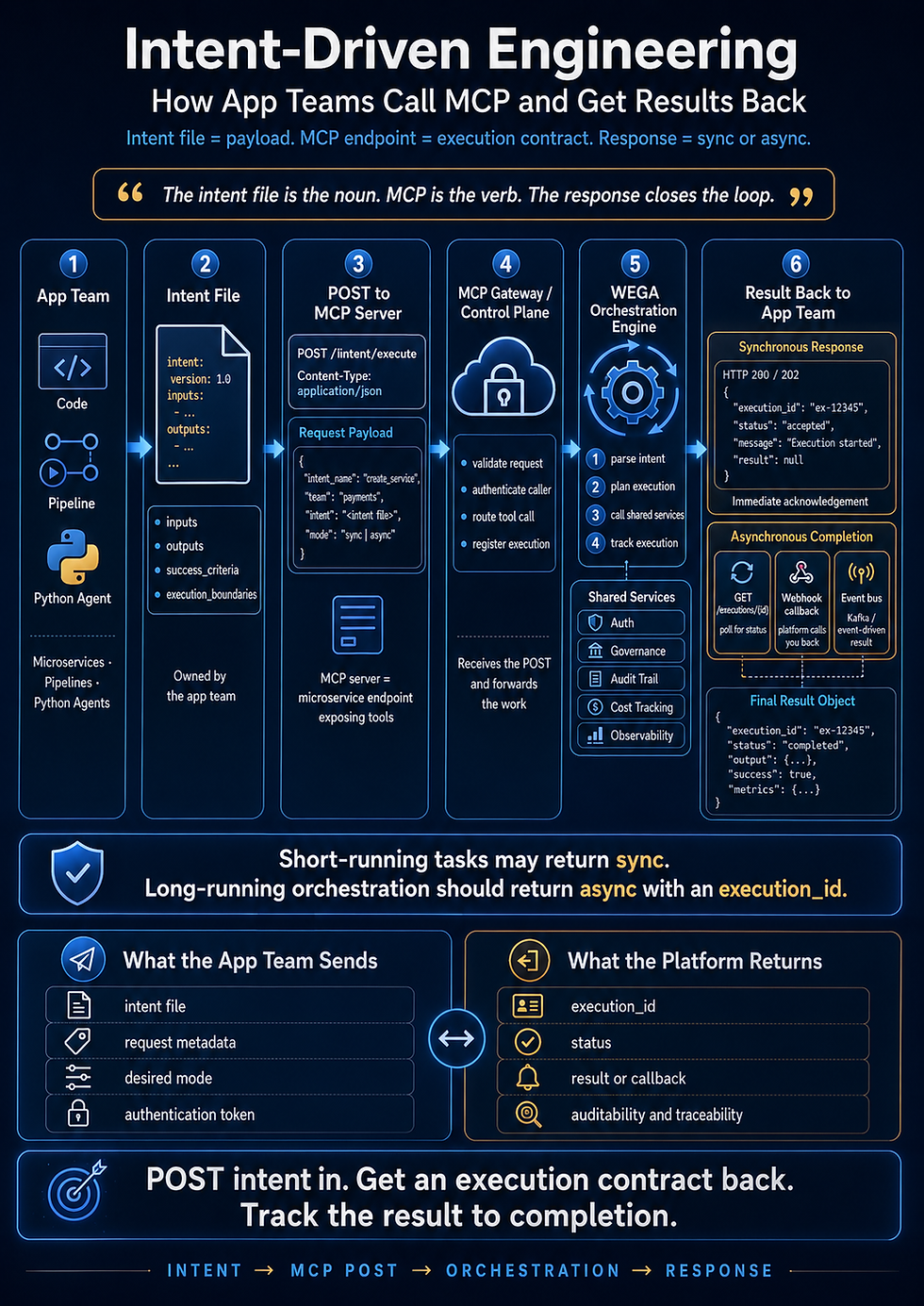
The architecture becomes:
BUSINESS INTENT
↓
INTENT CONTRACT
↓
AGENTIC HARNESS
↓
COORDINATOR
↓
SPECIALIZED AGENTS
↓
SCOPED TOOLS
↓
HOOKS AND POLICY GATES
↓
VALIDATION AND HUMAN REVIEW
↓
AUDITABLE OUTCOME
Intent remains the steering system.
The harness becomes the engine room.
Final Thought
Most developers do not need to build agentic loops, orchestrators, custom hooks, and multi-agent runtimes to use Claude effectively.
They need to write strong intent, understand their repositories, review plans, validate results, and remain accountable for the code they ship.
The advanced machinery belongs at the point where Claude becomes part of a production system rather than a supervised development environment.
That is where organizations need:
Agentic loops
Stop-reason handling
Tool execution
Subagent orchestration
Structured context passing
Programmatic hooks
Deterministic policy enforcement
Error recovery
Human escalation
Shared services
Enterprise governance
These are not unnecessary concepts.
They are necessary concepts applied at the wrong level when imposed on every developer.
The proper model is simple:
Inside the IDE, developers lead with intent.
At the team level, automation standardizes repeatable delivery.
At the enterprise level, shared services provides the harness, orchestration, tools, and governance.
Do not make every developer become an agent-platform engineer.
Let developers build features.
Let teams automate delivery.
Let shared services build the machinery that makes autonomous execution reliable.
Comments