

You Don’t Need Permission to Start: Building Portable AI Automation with Intent Files

# You Don’t Need Permission to Start: Building Portable AI Automation with Intent Files
One of the lessons I keep learning with enterprise AI is simple:
**The ideal architecture is not always the architecture you are allowed to use.**
You may know exactly how you would like to implement AI-assisted developer automation.
GitHub Copilot has repository-level customization, including `.github/copilot-instructions.md`, `.github/prompts/*.prompt.md`, path-specific instructions and custom agents. GitHub’s documentation describes [prompt files](https://docs.github.com/en/copilot/tutorials/customization-library/prompt-files) as reusable Markdown-based instructions that carry additional context and can be invoked from Copilot.
Cursor has its own mechanisms. Project rules can live under `.cursor/rules`, and Cursor also supports `AGENTS.md` as a simpler Markdown-based instruction mechanism. ([Cursor rules](https://prod.cursor.com/docs/rules))
Claude Code has its own configuration, permissions, CLI options and agent execution model. Its CLI can explicitly allow and disallow tools and can run non-interactively for automation scenarios. ([Claude Code CLI usage](https://docs.anthropic.com/en/docs/claude-code/cli-usage))
Those are excellent capabilities.
But what happens when you are working in a tightly controlled enterprise environment and **you cannot put files in those locations?**
That is exactly the problem we ran into. And it led us to an interesting conclusion.
## The Automation Does Not Have to Live Where the AI Vendor Wants It to Live
Our developers work in repositories where modifying certain structures, pipelines or enterprise configuration may not be allowed. That can eliminate the convenient options:
- `.github/...`
- `.cursor/...`
- `.claude/...`
- CI/CD modifications
- Hooks
- Specialized agent configuration
- Automatic discovery
At first, this feels like automation has been taken off the table.
It hasn’t.
Instead of waiting for every organizational permission, we created a separate **AI Automation directory containing reusable Markdown intent files**.
The files don’t magically execute themselves. The AI runner reads the intent file and carries out the operation using the tools already available in the developer environment:
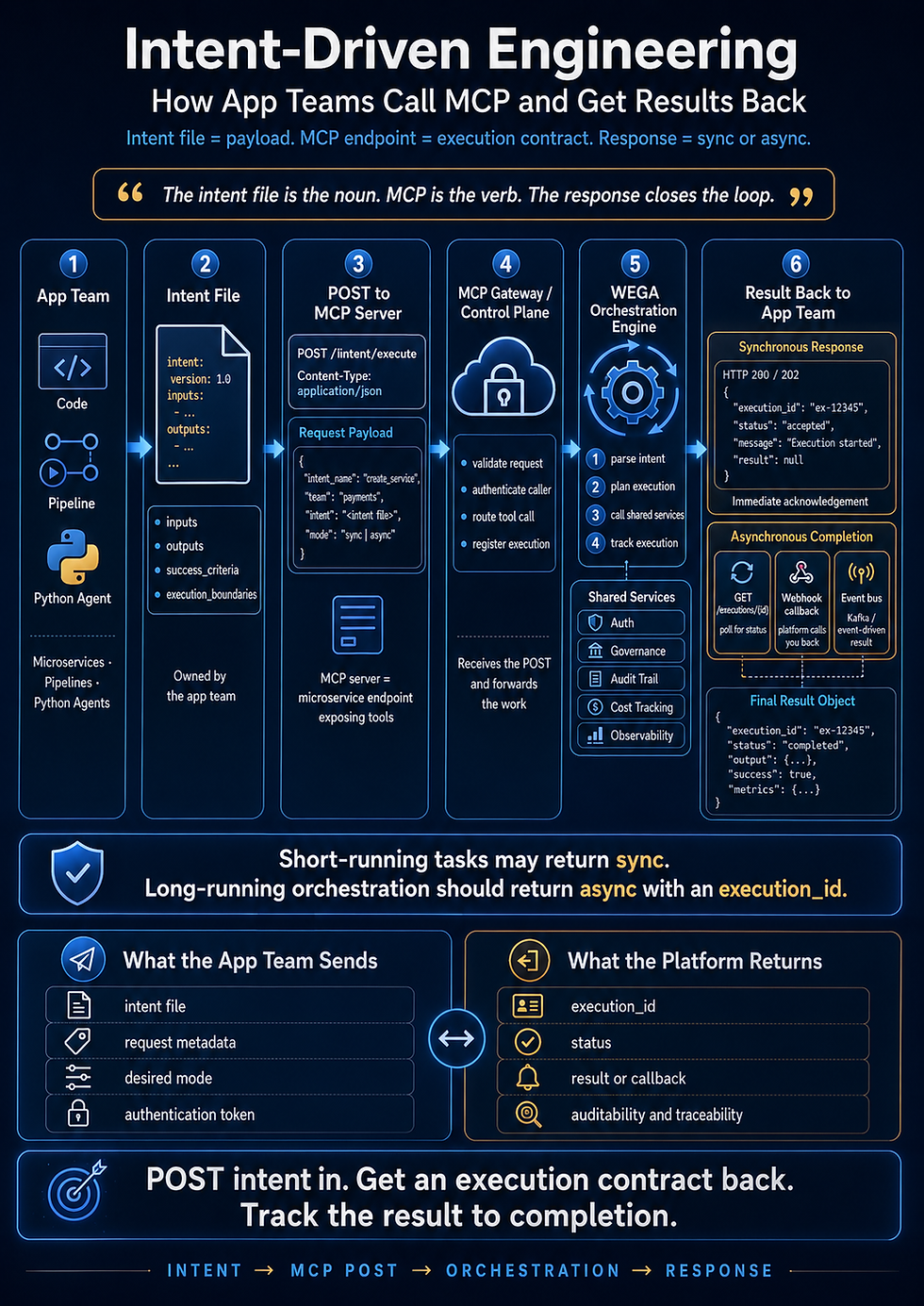
**Developer → Intent File → AI Runner → Existing CLI/Tools → Verification → Evidence**
That runner might be Copilot today. It might be Cursor tomorrow. It might be Claude Code somewhere else. The automation is no longer coupled to one AI product.
That is the important part.
## Stop Thinking of Them as Prompts
Some platforms call these files prompts. GitHub calls its reusable capability “prompt files.” That’s fine.
But I prefer to think of ours as **Intent Files**.
A prompt often sounds like: *Please examine this repository and run the appropriate security checks.*
An Intent File is different. It defines an operational outcome. It says what needs to happen, which tools may be used, what constitutes success, what evidence must be produced, and when the automation must stop.
We are not simply prompting an AI. We are defining an **execution contract**.
## Structure the Boundary, Not the Reasoning
This has become one of the most important principles in Intent-Driven Engineering:
**Structure the boundary, not the reasoning.**
You do not need to turn the Markdown file into a 300-line Bash script. If you do that, you should have written a script.
But the opposite extreme is just as dangerous. Giving an agent nothing but *Run our security scan* leaves too much undefined:
- Which scanner?
- Which command?
- What credentials?
- What represents success?
- What happens when the scanner is unavailable?
- Can another scanner be substituted?
- Can configuration validation be counted as a successful scan?
AI will try to reason through ambiguity. That is normally one of its strengths. Operational automation is one of the places where too much creativity becomes a weakness.
So we give the AI freedom **between known boundaries**.
## Declarative Where the Enterprise Already Knows the Answer
Where the enterprise already has a known mechanism, we declare it.
If Checkmarx must be invoked with a particular CLI command, put that command in the intent file. If the application must be built with `dotnet build`, say so. If Git must show a clean working tree before another action is taken, define that precondition. If the AWS CLI is the approved deployment mechanism, specify it.
The AI gains nothing from rediscovering deterministic enterprise operations every time the automation runs.
The pattern is:
**Intent → Preconditions → Known Mechanics → Risk Boundaries → Decision Rules → Verification → Evidence**
That is something between a prompt and a script, and that middle ground is extremely powerful.
## Make Failure Explicit
One of our biggest lessons came from security scanning.
An automation validated a shell file, validated YAML and validated CI configuration, and still never executed the security scan. Every one of those activities succeeded. The intent failed.
The automation has to distinguish between **the instructions being valid** and **the requested operation actually happening.**
An Intent File should define failure as carefully as it defines success. We give every automation the same small result vocabulary, so a result never depends on how the model feels about it:
|Result |Meaning |
|--------------|------------------------------------------------------------------------------------------------------------|
|`PASS` |Every verification condition was met, with evidence. |
|`FAIL` |The operation executed, and the outcome did not meet the success criteria (for example, a Critical finding).|
|`NOT_EXECUTED`|The requested operation never ran: missing tool, missing authentication, missing configuration. |
|`BLOCKED` |A precondition failed before anything ran. |
|`STOPPED` |A decision rule or unexpected condition halted the run. A human decides what happens next. |
Compare this:
> Verify that the security scan works.
with this:
> PASS only when the Checkmarx command actually executes, an execution identifier is returned, the scan reaches the required state, and results can be retrieved. If authentication or configuration prevents execution, return `NOT_EXECUTED`. Do not report PASS.
The first invites interpretation. The second is measurable.
## AI Reasons. Tools Prove.
Never let the AI grade its own homework.
Do not tell an AI *Confirm that the build succeeded.* Tell it to run `dotnet build`, and define success as exit code 0. The AI reports what happened. The tool determines whether it happened successfully.
**AI reasons. Tools prove.**
There is a subtler version of the same problem. If the model runs the command and then writes the evidence table from memory, the evidence is still self-reported. So capture evidence at the tool layer, not the model layer. Every command in an intent file is run so that its raw output and exit code land in files the tools wrote:
```bash
EVID="$HOME/.ai-evidence/$(basename "$PWD")/checkmarx-scan/$(git rev-parse HEAD)"
mkdir -p "$EVID"
cx scan create --project-name "$PROJECT" -s . --branch "$BRANCH" 2>&1 | tee "$EVID/02-scan-create.log"
echo "${PIPESTATUS[0]}" > "$EVID/02-scan-create.exit"
```
A few things worth noticing:
- `tee` shows the developer the output live while keeping a verbatim copy.
- `PIPESTATUS` captures the exit code of the command itself, not of `tee`.
- The evidence directory is keyed by commit SHA and lives outside the repository, so it never dirties the working tree and it makes re-run detection trivial (more on that below).
The report the model writes is a summary. The logs the tools wrote are the evidence. Ship both, and treat any disagreement between them as a failure.
## Read-Only and Mutating Automations Are Not the Same
A repository analysis is different from a deployment. A code coverage check is different from a `git push`. A security scan is different from deleting infrastructure.
Every automation declares its risk in the header:
```markdown
# Automation: Pre-PR Security Scan
Risk: READ-ONLY
Owner: Integration Architecture
```
or:
```markdown
# Automation: Development Deployment
Risk: MUTATING
Owner: Platform Engineering
```
Then the execution rules change accordingly.
**READ-ONLY** automations can proceed when the developer asks.
**MUTATING** automations run in two phases:
1. **Plan.** The runner performs the preconditions and any dry run, then produces a plan: the exact commands, the exact targets, the expected changes. It saves the plan as evidence, prints it, and stops.
1. **Execute.** Only after the developer replies with an explicit approval that references the plan, the runner executes exactly what the plan says, in order. If any actual target differs from the plan, it stops.
This gives you an audit artifact and a human checkpoint without needing a single native hook.
For higher-risk operations the AI must not invent recovery procedures. If an unexpected condition occurs:
**STOP. REPORT. DO NOT IMPROVISE.**
## Define What the AI Is Not Allowed to Substitute
Suppose the Intent File asks for a Checkmarx scan and Checkmarx is unavailable. An intelligent agent might reason: *I can still provide value. I’ll run another static analyzer.*
That is helpful in a conversation. It is incorrect in enterprise automation.
So the execution boundary is explicit:
- **Allowed:** the Checkmarx CLI, read-only `git` commands, and `bash` for evidence capture.
- **Do not substitute:** `npm audit`, SonarQube, another static-analysis product, CI configuration validation, or reading the code and offering an opinion.
- **If Checkmarx cannot execute:** STOP and return `NOT_EXECUTED`.
The agent still has room to reason. It cannot redefine the intent.
## Pair Every Boundary With a Wall You Can Touch
This is the honest part.
A do-not-substitute list is a request. If `npm audit` is installed on the machine, nothing in a Markdown file physically prevents the agent from running it. If the only thing standing between the agent and a bad outcome is a sentence in a file, you don’t have a boundary. You have a request.
So for each boundary that matters, look for something enforceable in the layers you *can* touch:
- A wrapper script that is the only approved entry point for the operation.
- Scoped credentials that cannot perform the mutating action from a developer session.
- A mandatory dry-run mode.
- Branch protection and required approvals.
- Environment restrictions and credential boundaries.
The Intent File should describe those controls. It should not pretend to replace them.
## Build for Re-Runs
Agentic automation has to assume things will stop halfway through. Sessions terminate. Credentials expire. Networks disconnect. Developers rerun commands.
“Explain what should happen on a re-run” as free text gets interpreted differently every time. Instead, name the states and name the check that detects each one. For the security scan:
|State |How to detect it |Action |
|------------------------------------|--------------------------------------------|-------------------------------------------------------------------------------|
|Not started |No evidence directory for this commit SHA |Run from step 1. |
|Scan created, not finished |Scan ID in the evidence, status not terminal|Resume at status polling. Do **not** create a new scan. |
|Scan finished, results not retrieved|Terminal status logged, no results file |Retrieve results only. |
|Complete |Results file exists for this commit SHA |Report the existing evidence. Rescan only if the developer says “force rescan.”|
Traditional developers call this idempotence. It matters just as much when an AI is controlling the execution, and it turns a judgment call into a lookup.
## Create an Automation Catalog, and Make It a Policy Layer
Once several intent files exist, create one small index: `AUTOMATIONS.md`.
```text
AI-Automation/
├── AUTOMATIONS.md
├── code-coverage.md
├── tmf-scaffold.md
```
The catalog is the discovery mechanism the restricted environment prevented us from installing natively. Instead of teaching every developer every automation, point the AI at the catalog.
But it can do more than describe. It can carry the rules every automation shares:
```markdown
# AI Automation Catalog
## Runner Rules (apply to every automation)
1. Read this catalog first. Do not run an automation that is not listed here.
2. READ-ONLY automations may run when the developer asks.
3. MUTATING automations run only through the two-phase gate: plan, then explicit approval. Never auto-execute.
4. If an automation has no Version or no Owner, do not run it.
5. Report every result using the standard vocabulary: PASS, FAIL, NOT_EXECUTED, BLOCKED, STOPPED.
## Automations
| Automation | File | Risk | Approval | Version | Owner |
|---|---|---|---|---|---|
| Pre-PR Security Scan | checkmarx-scan.md | READ-ONLY | none | 1.0.0 | Integration Architecture |
| Code Coverage | code-coverage.md | READ-ONLY | none | 1.0.0 | Integration Architecture |
| Pre-PR Scorecard | pre-pr-scorecard.md | READ-ONLY | none | 1.0.0 | Integration Architecture |
| Build Validation | build-validation.md | READ-ONLY | none | 1.0.0 | Integration Architecture |
| TMF Scaffold | tmf-scaffold.md | MUTATING | two-phase | 1.0.0 | Integration Architecture |
| Development Deployment | dev-deployment.md | MUTATING | two-phase | 1.0.0 | Platform Engineering |
```
That turns the catalog from documentation into a lightweight policy layer. It isn’t as strong as native hooks or enforced tool permissions. For many developer workflows, it gets surprisingly close.
## Treat Intent Files Like Contracts: Version Them and Test Them
A library of intent files will accumulate variants. Contracts need an owner, a version, and a way to know they still work.
Every intent file carries a header:
```markdown
Version: 1.0.0
Owner: Integration Architecture
Last verified: <date> on <runner> / <model>
```
And every intent file gets a **conformance check**: two small fixture runs.
- **Happy path.** Run the automation against a known-good setup. Expected result: `PASS`, with the evidence files present.
- **Sabotaged path.** Run it with the critical dependency deliberately broken, for example authentication removed. Expected result: `NOT_EXECUTED`, no substitute tool used, no `PASS` anywhere.
The sabotaged run is the important one. It tests the thing intent files exist to guarantee: when the operation cannot happen, the automation says so instead of improvising.
Re-run both fixtures whenever the runner or the model changes, and update `Last verified`. Otherwise “portable” quietly becomes “works on whatever we tested last quarter.”
## Running the Same Intent File Across Different AI Systems
The invocation mechanics differ. That’s okay. The contract doesn’t have to.
- **GitHub Copilot** works with reusable prompt files and file context, including `#file` references in supported environments.
- **Cursor** allows rules to be manually applied or files to be brought into the agent’s context, while native project rules normally reside under `.cursor/rules`.
- **Claude Code** accepts instructions interactively or through its CLI, including files and shell-oriented workflows, subject to its permissions.
The syntax changes. The intent does not. A runner-neutral invocation is often enough:
```text
Read AI-Automation/AUTOMATIONS.md, then execute AI-Automation/checkmarx-scan.md
against this repository. Follow it exactly. Where it says STOP, stop.
```
And when a developer doesn’t know the invocation syntax for a particular tool, there is a wonderfully simple solution: ask the AI. *How do I execute this intent file using Copilot?* The AI generally knows its own interaction model.
There is a bigger difference than syntax, though, and it’s behavioral. Runners differ in how strictly they honor STOP, how they handle ambiguity (ask or improvise), how they cope with long files, and how faithfully they report command output. So portability is a claim you test, not a claim you make. The sabotaged-path fixture above, run through each runner you care about and recorded in `Last verified`, is the evidence.
## Markdown Instructions Are Not Security Enforcement
There is an important limitation, and the vendors say it themselves.
GitHub notes that AI customization may not be followed identically every time because of the nondeterministic nature of AI systems. ([GitHub Docs](https://docs.github.com/en/copilot/concepts/prompting/response-customization)) Cursor similarly warns that AI guidance should not be the only security mechanism for compliance-sensitive workflows. ([Cursor rules](https://prod.cursor.com/docs/rules))
Truly dangerous operations should still be constrained at the tooling layer: permissions, IAM, branch protection, CLI permissions, dry-run modes, required approvals, environment restrictions, credential boundaries.
Intent Files describe those controls. They do not replace them.
## A Starting Template
Here is the pattern we use:
```markdown
# Automation: <name>
Version: 1.0.0
Risk: READ-ONLY | MUTATING
Owner: <team>
Approval: none | two-phase
Last verified: <date> on <runner> / <model>
Evidence directory: ~/.ai-evidence/<repo>/<automation>/<commit-sha>/
## Intent
One short paragraph describing the desired outcome, and what this automation
does not touch.
## Preconditions
Checks that must pass before anything runs, in order. If any fails: return
BLOCKED with the failing check, and stop.
## Known Commands
The approved, deterministic commands, exactly as written. Values in <> come
from the repository or the developer.
## Execution Boundaries
Allowed: tools and commands.
Do not substitute: named alternatives that are NOT acceptable.
If the required tool cannot execute: STOP and return NOT_EXECUTED.
## Decision Rules
Important branch conditions, each with a defined result code.
## Re-Run Behavior
| State | How to detect it | Action |
|---|---|---|
## Verification
Machine-observable conditions for PASS: exit codes and evidence files, never
the model's judgment.
## Evidence
Every command's raw output goes to <evidence-dir>/NN-name.log and its exit code
to NN-name.exit. Never paraphrase tool output.
## Output
Return a table (Step | Command | Exit | Evidence file), then one final line:
RESULT: PASS | FAIL | NOT_EXECUTED | BLOCKED | STOPPED
```
Notice what isn’t there: hundreds of lines explaining how the AI should think. That’s deliberate. We structure the execution boundary and let the AI reason inside it.
## A Worked Example: The Pre-PR Security Scan (READ-ONLY)
Here is a complete intent file. The commands are illustrative; replace them with your organization’s approved invocation.
```markdown
# Automation: Pre-PR Security Scan
Version: 1.0.0
Risk: READ-ONLY
Owner: Integration Architecture
Approval: none
Evidence directory: ~/.ai-evidence/<repo>/checkmarx-scan/<commit-sha>/
## Intent
Run the approved Checkmarx scan against the current branch and report whether
it completed and what it found. This automation does not modify the
repository, the pipeline, or any environment.
## Preconditions
Check in order. If any fails, return BLOCKED with the failing check and stop.
1. Inside a git repository: `git rev-parse --is-inside-work-tree` prints `true`.
2. Working tree clean, so the result maps to a commit: `git status --porcelain` prints nothing.
3. CLI present: `cx version` exits 0.
4. Credentials valid: `cx auth validate` exits 0. Never print, log, or echo credentials.
## Known Commands
1. Start scan: `cx scan create --project-name <project> -s . --branch <current-branch>`
2. Check status: `cx scan show --scan-id <scan-id>`
3. Retrieve results: `cx results show --scan-id <scan-id> --report-format summaryConsole`
## Execution Boundaries
Allowed: the `cx` CLI, read-only `git` commands, and `bash` for evidence capture.
Do not substitute: `npm audit`, SonarQube, any other static-analysis product,
CI configuration validation, or reading the code and offering an opinion.
Do not modify files, install tools, or change credentials.
If Checkmarx cannot execute: STOP and return NOT_EXECUTED.
## Decision Rules
- CLI or authentication unavailable: STOP, return NOT_EXECUTED.
- Scan ends in a failed or canceled state: STOP, return FAIL with the status. Do not restart it.
- Scan still running after 30 minutes: STOP, return STOPPED with the scan ID so a re-run can resume.
- Any Critical or High finding: return FAIL. Report counts and locations. Do not attempt fixes.
- Output that cannot be interpreted: STOP, return STOPPED with the raw output.
## Re-Run Behavior
| State | How to detect it | Action |
|---|---|---|
| Not started | No evidence directory for this commit SHA | Run from Known Commands step 1. |
| Scan created, not finished | Scan ID in evidence, status not terminal | Resume at step 2. Do not create a new scan. |
| Scan finished, results not retrieved | Terminal status logged, no results file | Run step 3 only. |
| Complete | Results file exists for this commit SHA | Report existing evidence. Rescan only if the developer says "force rescan." |
## Verification
PASS only when ALL are true, as recorded in the evidence files:
1. `01-scan-create.exit` is 0 and `01-scan-create.log` contains a scan ID.
2. The latest status log shows a terminal state of Completed.
3. `03-results.exit` is 0 and `03-results.log` is non-empty.
4. The results contain zero Critical and zero High findings.
If conditions 1 to 3 are not met, apply the Decision Rules. Never report PASS.
## Evidence
Run every command so that output goes to <evidence-dir>/NN-name.log and the
exit code to NN-name.exit. Quote log excerpts verbatim. Do not paraphrase.
## Output
A table: Step | Command | Exit | Evidence file
Then one final line: RESULT: PASS | FAIL | NOT_EXECUTED | BLOCKED | STOPPED
```
## A Worked Example: The Two-Phase Gate (MUTATING)
For a mutating automation, the sections that change are the header and the execution model. Everything else follows the template.
```markdown
# Automation: Development Deployment
Version: 1.0.0
Risk: MUTATING
Owner: Platform Engineering
Approval: two-phase
## Intent
Deploy the current build artifact to the development environment using the
approved AWS CLI mechanism. Nothing outside the development environment is touched.
## Phase 1: Plan (no changes)
1. Run all Preconditions.
2. Run the approved dry run: `<approved dry-run command>`. If no dry run exists, return BLOCKED.
3. Write PLAN.md to the evidence directory: exact commands in order, target
account, region and environment, artifact identifier, expected changes,
and a plan-id.
4. Print PLAN.md. STOP and wait for the developer.
## Phase 2: Execute (only after approval)
Proceed only if the developer replies exactly: `APPROVE <plan-id>` with a
plan-id that matches PLAN.md. Any other reply: return STOPPED.
1. Execute exactly the commands in PLAN.md, in order, capturing evidence for each.
2. Before each command, confirm its target matches PLAN.md. If any differs, STOP.
3. Run the approved post-deploy health check. Success is exit code 0 AND the
expected output in the evidence log.
## Decision Rules
- Any command fails: STOP. REPORT. DO NOT IMPROVISE.
- Do not attempt rollback. Rollback happens only through the documented runbook,
performed by a human.
```
## Don’t Wait for the Perfect Enterprise AI Platform
This may be the most important part of the entire experiment.
Consultants and enterprise developers spend a lot of time waiting. Waiting for a security review. Waiting for a pipeline change. Waiting for another product to be approved. Waiting for access to a directory. Waiting for the official enterprise plugin architecture. Waiting for somebody to decide what the organization’s AI development strategy is going to be.
Some of that governance is necessary. But it does not mean learning has to stop.
If you have an approved AI coding assistant, an approved development environment and approved command-line tools, you can begin capturing repeatable engineering work as intent **today**.
1. Start with one automation. Pick something developers repeatedly do by hand.
1. Write down the intent.
1. Declare the known commands.
1. Define the boundaries.
1. Define failure, then success.
1. Require evidence.
1. Run it, and watch where the agent gets confused.
1. Fix the Intent File. Run it again.
That is how the automation library grows. Not from designing the perfect AI platform upfront, but from capturing one repeatable engineering intent at a time.
## The Bigger Idea
What started as a workaround for enterprise restrictions is turning into something more interesting.
We aren’t creating a collection of clever prompts. We are creating a **portable library of engineering intent**.
Today an Intent File might be executed by GitHub Copilot. Tomorrow the same engineering intent might be executed by Cursor. Another team might use Claude Code. Eventually an enterprise runner or internal agent platform may consume it automatically.
The runtime will change. The tools will change. The models will change.
The intent can survive all of them.
**Don’t hard-wire your engineering knowledge into whichever AI tool happens to be popular this year.**
Capture the intent. Structure the boundaries. Let the tools execute it. Verify the result. And start now.
-----
**Intent-Driven Engineering**
*Structure the boundary, not the reasoning.*
[Intent-Driven-Engineering.com](http://Intent-Driven-Engineering.com)
Comments