

Article #8: MCP Is the Enterprise Plug-In Layer for Claude Code Architects
- Mark Kendall
- 1 day ago
- 8 min read

Article #8: MCP Is the Enterprise Plug-In Layer for Claude Code Architects
Why MCP Matters for the Claude Certified Architect Exam
If you are preparing for the Claude Certified Architect certification, one of the most important ideas to understand is this:
Claude is powerful by itself, but Claude becomes enterprise-capable when it can safely connect to the right tools, data, systems, and workflows.
That is where MCP comes in.
MCP stands for Model Context Protocol. In simple terms, MCP gives Claude a structured way to connect to external systems. Those systems might include GitHub, Jira, Confluence, databases, file systems, design tools, observability platforms, cloud services, or internal enterprise APIs.
For an architect, MCP is not just a technical feature. It is an architectural pattern.
It answers a major enterprise question:
How do we let AI interact with real systems without giving it uncontrolled access to everything?
That is the architect’s job.
Not just to make Claude smart.
Not just to make Claude productive.
But to make Claude useful, controlled, reliable, auditable, and safe inside the enterprise.
The Simple Way to Think About MCP
Think of Claude Code as the reasoning and orchestration layer.
Think of MCP servers as controlled gateways into enterprise capabilities.
Claude does not need to know everything directly. It needs access to the right context at the right time through well-designed interfaces.
An MCP server can expose a tool such as:
Search Jira issues
Read a Confluence page
Inspect a GitHub repository
Query a database
Retrieve deployment logs
Pull Figma design metadata
Check test results
Read a service catalog
Create a ticket
Trigger a validation workflow
From Claude’s perspective, these are tools.
From the architect’s perspective, they are governed integration points.
That distinction matters.
The certification exam is not only testing whether you know that tools exist. It is testing whether you understand how to design systems where Claude can use tools safely and effectively.
Claude Code Without MCP vs. Claude Code With MCP
Without MCP, Claude Code can still be helpful. It can reason over files, generate code, write tests, explain architecture, and assist with development.
But without external tool access, Claude’s view is limited to what is in the working context.
With MCP, Claude can participate in a much larger enterprise workflow.
For example, instead of asking Claude:
“Look at this code and tell me what might be wrong.”
You can build a workflow where Claude can:
Read the Jira story.
Pull the related Confluence requirements.
Inspect the repo.
Check previous pull requests.
Look at the deployment logs.
Review test failures.
Compare the implementation against the original intent.
Recommend the next action.
That is not just code assistance.
That is architectural orchestration.
That is exactly the kind of thinking a Claude Certified Architect needs to develop.
MCP Is Not Just About Connecting Tools
The easy mistake is to think MCP is just another integration mechanism.
It is more than that.
MCP is about controlled context delivery.
Claude does not need unlimited access to every enterprise system. In fact, that would be dangerous.
A good architect designs MCP access around specific use cases.
For example:
Bad MCP Design
Give Claude broad access to all Jira projects, all repos, all Confluence pages, and all databases.
That may sound powerful, but it creates risk.
Claude may retrieve irrelevant context, expose sensitive information, slow down workflows, or make incorrect assumptions based on noisy data.
Good MCP Design
Create focused MCP tools such as:
get_story_requirements(story_id)
get_related_architecture_decisions(service_name)
get_recent_build_failures(repo_name)
get_test_coverage_summary(branch_name)
get_deployment_health(environment, service_name)
search_design_assets(feature_name)
retrieve_api_contract(service_name)
These tools are narrow, intentional, and easier to govern.
That is the architect’s mindset.
Do not give Claude the whole company.
Give Claude the right capability for the task.
The Architect’s MCP Design Questions
When designing MCP for Claude Code, an architect should ask several questions.
First, what job is Claude trying to perform?
Is Claude helping with coding, testing, architecture review, debugging, story refinement, deployment validation, production support, or documentation?
Second, what context does Claude need to do that job well?
Does it need source code, requirements, logs, diagrams, API contracts, tickets, test results, metrics, or historical decisions?
Third, where does that context live?
Is it in GitHub, GitLab, Jira, Confluence, SharePoint, Figma, Datadog, Splunk, AWS, Azure, Kubernetes, OpenSearch, or internal systems?
Fourth, what should Claude be allowed to do?
Should it only read information? Should it create draft changes? Should it open pull requests? Should it update tickets? Should it trigger workflows? Should it ever perform write actions automatically?
Fifth, how do we control and audit the behavior?
Can we log tool calls? Can we restrict access by role? Can we require approval before write actions? Can we trace which context Claude used when producing an answer?
These are certification-level questions.
Claude Certified Architects need to think beyond “Can Claude call a tool?”
They need to think:
Should Claude call this tool, when should it call it, what should it be allowed to see, and how do we prove the result is reliable?
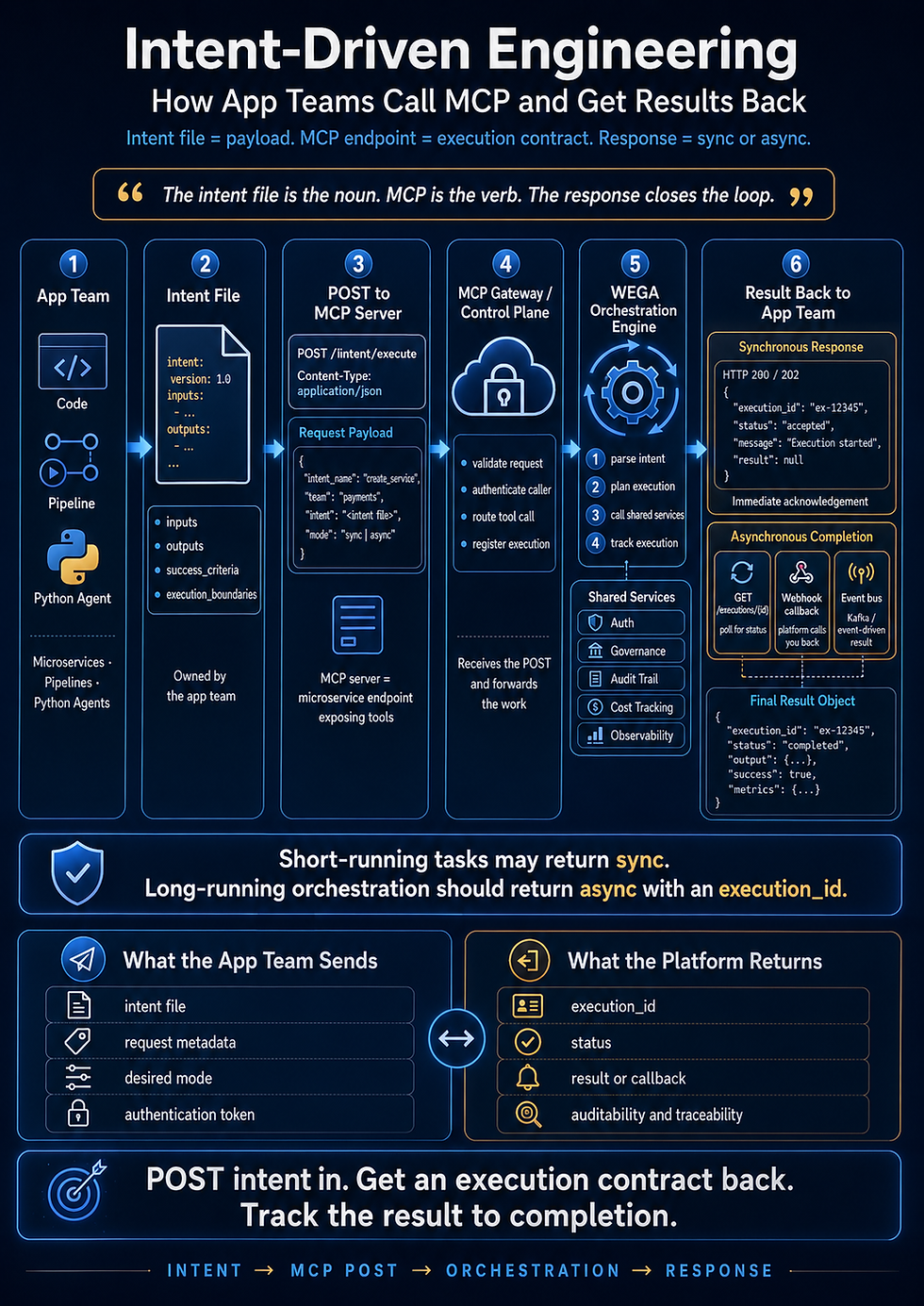
MCP and Intent-Driven Engineering
This is where MCP becomes especially powerful for Intent-Driven Engineering.
In an intent-driven workflow, the intent file describes what needs to be built, why it matters, what constraints apply, what acceptance criteria must be met, and what evidence proves completion.
Claude Code can use that intent file as the operating contract.
MCP can then provide the external evidence.
For example, an intent file may say:
Build the customer notification API and prove that it passes contract tests, security checks, and deployment validation.
Claude Code can reason over the intent.
MCP tools can gather the proof:
Pull the API contract.
Read the existing service patterns.
Retrieve test results.
Check pipeline status.
Review security scan output.
Inspect deployment logs.
Update the Jira ticket with evidence.
This is where Claude Code becomes more than a coding assistant.
It becomes part of a controlled engineering operating model.
The architect’s goal is not to have AI randomly do work.
The goal is to create a system where intent drives execution, tools provide context, and evidence proves completion.
The MCP Pattern for Enterprise Architecture
A strong enterprise MCP design usually has four layers.
1. Claude Code
This is the reasoning and execution assistant. Claude reads the intent, understands the repository, plans changes, writes code, tests, explains, and coordinates work.
2. Local Project Context
This includes the repo, CLAUDE.md, intent files, architecture notes, coding standards, test commands, and team conventions.
This is the first layer of grounding.
3. MCP Tool Layer
This layer connects Claude to approved external systems.
Examples include Jira, Confluence, GitHub, Figma, databases, observability tools, cloud services, and deployment systems.
This is the controlled enterprise access layer.
4. Governance and Evidence Layer
This includes permissions, logs, approvals, audit trails, test results, validation reports, and human review checkpoints.
This is what makes the system enterprise-ready.
A good architect does not stop at integration.
A good architect designs the full operating model.
MCP Should Be Designed Around Workflows
The best MCP tools are not random utilities.
They are designed around workflows.
For example, consider a feature delivery workflow.
Claude Code may need tools such as:
get_jira_story
get_acceptance_criteria
get_design_reference
get_api_contract
get_repo_standards
run_unit_tests
get_test_results
create_pull_request_summary
update_story_status
Now consider a production support workflow.
Claude may need:
get_recent_incidents
get_service_health
get_error_logs
get_deployment_history
get_recent_code_changes
get_runbook
summarize_root_cause
draft_incident_update
These are different workflows, so they need different MCP designs.
That is an important certification concept.
Tool design should follow the job Claude is being asked to perform.
Read Tools vs. Write Tools
One of the most important design distinctions is read access versus write access.
Read tools allow Claude to retrieve information.
Examples:
Read a Jira story
Read a Confluence page
Read logs
Read test results
Read repository metadata
Write tools allow Claude to change something.
Examples:
Create a Jira ticket
Update a status
Open a pull request
Trigger a deployment
Modify a database record
Send a notification
For enterprise use, write tools require much stronger governance.
An architect may decide that Claude can freely read approved context but must ask for human approval before write actions.
That might look like this:
Claude can inspect a story.
Claude can recommend changes.
Claude can draft an update.
Claude cannot update Jira without approval.
Claude can prepare a pull request.
Claude cannot merge it.
Claude can analyze deployment health.
Claude cannot deploy to production automatically.
This is not weakness.
This is enterprise architecture.
The more powerful the tool, the stronger the control model needs to be.
MCP and Context Management
MCP is also part of context management.
Claude has a context window, but enterprise systems have massive amounts of information. The architect must decide what context gets retrieved, summarized, filtered, or ignored.
A poor design floods Claude with too much information.
A strong design retrieves only the context needed for the task.
For example, instead of giving Claude 50 Confluence pages, give it:
The architecture decision record related to this service
The current API contract
The coding standard for this repo
The acceptance criteria for the current story
The latest failed test output
That is enough to act intelligently.
More context is not always better.
Relevant context is better.
MCP should help Claude get the right context, not all context.
MCP and Reliability
For certification, reliability matters.
When Claude uses tools, the architect should think about failure cases.
What happens if the MCP server is unavailable?
What happens if the tool returns incomplete information?
What happens if Jira has stale requirements?
What happens if Confluence contradicts the code?
What happens if logs are too large?
What happens if Claude retrieves the wrong document?
Reliable MCP design includes guardrails such as:
Clear tool descriptions
Narrow tool scopes
Input validation
Permission checks
Error handling
Logging
Human approval for sensitive actions
Evidence capture
Fallback behavior
Tool output summaries
Clear separation between facts and assumptions
The architect should not assume that tool access automatically makes Claude correct.
Tool access gives Claude more capability.
Architecture gives that capability control.
A Simple MCP Example for Architects
Imagine a team wants Claude Code to help implement Jira stories faster.
The architect could define this flow:
Developer opens a feature branch.
Developer provides the Jira story ID.
Claude reads the local repo context.
Claude calls an MCP tool to retrieve the Jira story.
Claude calls another MCP tool to retrieve related Confluence requirements.
Claude reads CLAUDE.md for team standards.
Claude creates an implementation plan.
Developer approves the plan.
Claude modifies code.
Claude runs tests.
Claude summarizes what changed.
Claude prepares a pull request description.
Human reviews and submits.
That is a clean human-in-the-loop architecture.
Claude does not run wild.
Claude works inside a designed system.
That is what enterprise adoption requires.
What the Exam Wants You to Understand
For the Claude Certified Architect exam, you should understand MCP at the architectural level.
You do not only need to memorize what MCP stands for.
You need to understand why it matters.
You should be able to explain that MCP:
Connects Claude to external systems.
Provides controlled access to tools and data.
Enables enterprise workflows.
Supports context retrieval.
Helps Claude operate beyond the local repo.
Requires governance, permissions, and auditability.
Should be designed around specific use cases.
Should separate read tools from write tools.
Should support reliability and human oversight.
Most importantly, you should understand that MCP is not magic.
It is an interface layer.
The architect still has to design the operating model.
The Enterprise Architect’s Rule for MCP
Here is the rule I would use:
Do not design MCP around systems. Design MCP around decisions, workflows, and evidence.
That is the mindset shift.
It is not:
“Can Claude connect to Jira?”
It is:
“What does Claude need from Jira to correctly implement, validate, and prove this story?”
It is not:
“Can Claude connect to logs?”
It is:
“What deployment or production question should Claude be able to answer from these logs?”
It is not:
“Can Claude access Confluence?”
It is:
“Which architecture decisions are relevant to the work Claude is doing right now?”
That is architect thinking.
Final Thought
MCP is one of the most important pieces of the Claude Code enterprise story.
Claude Code gives us reasoning, planning, coding, and workflow support.
Intent files give us direction.
CLAUDE.md gives us memory and operating rules.
MCP gives us controlled access to the enterprise.
Together, they create the foundation for a real AI-assisted engineering operating model.
For certification, this is exactly the kind of concept that matters.
You are not just learning a tool.
You are learning how to architect a system where AI can participate in software delivery safely, reliably, and with evidence.
That is the difference between using Claude Code as a smart assistant and designing Claude Code as part of an enterprise engineering platform.
:::
For Article #9, the clean next move is probably “Designing Tools for Claude: Why Tool Descriptions, Inputs, Outputs, and Guardrails Matter.” That keeps us inside the MCP/tool-design domain and pushes deeper into exam territory.
Comments