

Article #9: Designing Tools for Claude — The Architect’s Guide to Safe, Useful, Reliable Tooling
- Mark Kendall
- Jul 4
- 9 min read

Article #9: Designing Tools for Claude — The Architect’s Guide to Safe, Useful, Reliable Tooling
Why Tool Design Matters for the Claude Certified Architect Exam
In the last article, we talked about MCP as the enterprise plug-in layer for Claude Code.
Now we need to go one level deeper.
It is not enough to connect Claude to tools.
The real architectural question is:
Are those tools designed well enough for Claude to use them safely, correctly, and reliably?
That is where tool design becomes important.
For the Claude Certified Architect exam, this is a critical topic. Claude can reason, plan, explain, and generate code, but when Claude starts using tools, the system becomes more powerful and more dangerous at the same time.
A poorly designed tool can confuse Claude.
A vague tool can produce bad results.
An overly broad tool can expose too much data.
A dangerous tool can allow Claude to take actions that should require human approval.
A well-designed tool, on the other hand, can make Claude much more reliable.
That is the architect’s responsibility.
Not just to give Claude access.
But to design the access properly.
What Is a Tool in Claude Architecture?
A tool is a capability Claude can call to perform a specific action or retrieve specific information.
A tool might:
Search Jira
Read a Confluence page
Query a database
Inspect logs
Run a test
Retrieve an API contract
Summarize deployment status
Create a ticket
Draft a pull request
Validate a design against standards
In an MCP-based architecture, these tools may be exposed through MCP servers.
But the principle applies broadly.
Any time Claude can call an external function, API, or capability, you are designing a tool.
And when you design tools, you are designing Claude’s operating environment.
That is a major architectural responsibility.
The Architect’s Core Rule for Tool Design
Here is the rule:
A good tool should make the right action obvious and the wrong action difficult.
That means the tool should be specific, clear, constrained, and aligned with the workflow.
Claude should not have to guess what the tool does.
Claude should not have to guess what inputs are required.
Claude should not receive messy output that it has to interpret blindly.
Claude should not be given powerful write access when read access is enough.
A good tool reduces ambiguity.
A bad tool increases ambiguity.
And ambiguity is one of the biggest enemies of reliable AI systems.
Bad Tool Design vs. Good Tool Design
Imagine we want Claude to retrieve requirements for a feature.
A bad tool might look like this:
search_everything(query)
That sounds convenient, but it is dangerous.
What does “everything” mean?
Jira? Confluence? GitHub? Slack? SharePoint? Old documents? Draft notes? Archived decisions?
Claude may retrieve too much context, irrelevant context, or conflicting context.
A better tool would be:
get_jira_story(story_id)
That is clearer.
An even stronger enterprise tool might be:
get_story_requirements(story_id, include_acceptance_criteria=true, include_linked_design_docs=true)
Now the tool is aligned with the workflow.
Claude knows what it is getting.
The architect knows what the tool is allowed to return.
The result is easier to govern and easier to trust.
Tool Names Matter
Tool names are part of the prompt surface.
Claude uses the tool name to understand when the tool should be called.
So tool names should be descriptive and action-oriented.
Weak tool names:
fetch
lookup
process
handler
doThing
querySystem
runAction
Better tool names:
get_jira_story
retrieve_api_contract
summarize_recent_deployment_failures
get_service_health
run_unit_tests
create_pull_request_draft
validate_intent_against_acceptance_criteria
The tool name should tell Claude exactly what the tool is for.
Architecturally, this matters because Claude is not just calling code.
Claude is choosing from capabilities.
The clearer the capability, the more reliable the choice.
Tool Descriptions Matter Even More
The tool description tells Claude when and why to use the tool.
A weak tool description might say:
Gets data from Jira.
That is not enough.
A stronger description might say:
Use this tool to retrieve a single Jira story by story ID, including title, description, acceptance criteria, status, linked issues, and related design references. Use this before planning implementation work for a Jira story.
That description gives Claude operational guidance.
It says:
What the tool retrieves
What input it expects
What output it provides
When to use it
Why to use it
For certification, this matters because tool design is part of system behavior.
The model is only one part of the architecture.
The tool interface shapes what the model does.
Inputs Should Be Narrow and Validated
Every tool should have clear inputs.
Do not make Claude pass vague blobs of text when a structured input would be safer.
For example, instead of:
get_requirements(query_text)
Use:
get_story_requirements(story_id, project_key)
Instead of:
get_logs(search_string)
Use:
get_service_logs(service_name, environment, start_time, end_time, severity)
Instead of:
update_ticket(data)
Use:
draft_ticket_update(ticket_id, proposed_status, summary, evidence_links)
Structured inputs reduce errors.
They also make it easier to validate requests before the tool executes.
The tool can reject invalid inputs, missing fields, unsafe values, or unauthorized actions.
That is not just programming hygiene.
That is enterprise AI safety.
Outputs Should Be Structured
Tool output matters just as much as tool input.
If a tool returns a giant messy text blob, Claude has to interpret everything.
That increases risk.
A better tool returns structured output.
For example, a Jira story tool might return:
Story ID
Title
Description
Acceptance criteria
Status
Priority
Linked documents
Related services
Last updated date
Source URL
Data confidence
A deployment health tool might return:
Service name
Environment
Current status
Last deployment time
Error rate
Failed checks
Relevant log excerpts
Recommended investigation areas
Evidence links
Structured output helps Claude reason more accurately.
It also supports auditability.
If Claude produces a recommendation, the architect can trace which tool output informed that recommendation.
Tool Design and Context Management
Tool design is also context management.
A tool should not return everything it can possibly find.
It should return what Claude needs for the task.
For example, if Claude is implementing a feature, it may need:
The current story
Acceptance criteria
Relevant API contract
Recent related changes
Team coding standards
It probably does not need:
Every historical discussion about the product
Old versions of the requirements
Unrelated tickets
Entire log files
All Confluence pages mentioning the feature name
The more irrelevant context Claude receives, the greater the chance that it will become distracted or make the wrong inference.
A good tool filters context before Claude sees it.
That is an important architectural principle:
Do not use tools to dump data into Claude. Use tools to deliver useful context.
Read Tools Should Be Easy. Write Tools Should Be Controlled.
One of the most important tool design decisions is whether the tool reads information or changes something.
Read tools are usually lower risk.
Examples:
Get a story
Read logs
Retrieve test results
Search documentation
Inspect repository metadata
Write tools are higher risk.
Examples:
Update a ticket
Merge a pull request
Trigger deployment
Modify a database
Send an email
Delete a resource
Change access permissions
In enterprise architecture, write tools should usually have stronger controls.
That may include:
Human approval
Draft-only behavior
Role-based access
Environment restrictions
Audit logging
Change previews
Rollback instructions
Confirmation steps
A good pattern is:
Let Claude draft. Let humans approve.
For example, Claude can draft a Jira update, but a human clicks submit.
Claude can prepare a pull request description, but a developer opens or merges the PR.
Claude can recommend deployment, but a release manager approves it.
That is how we get value without losing control.
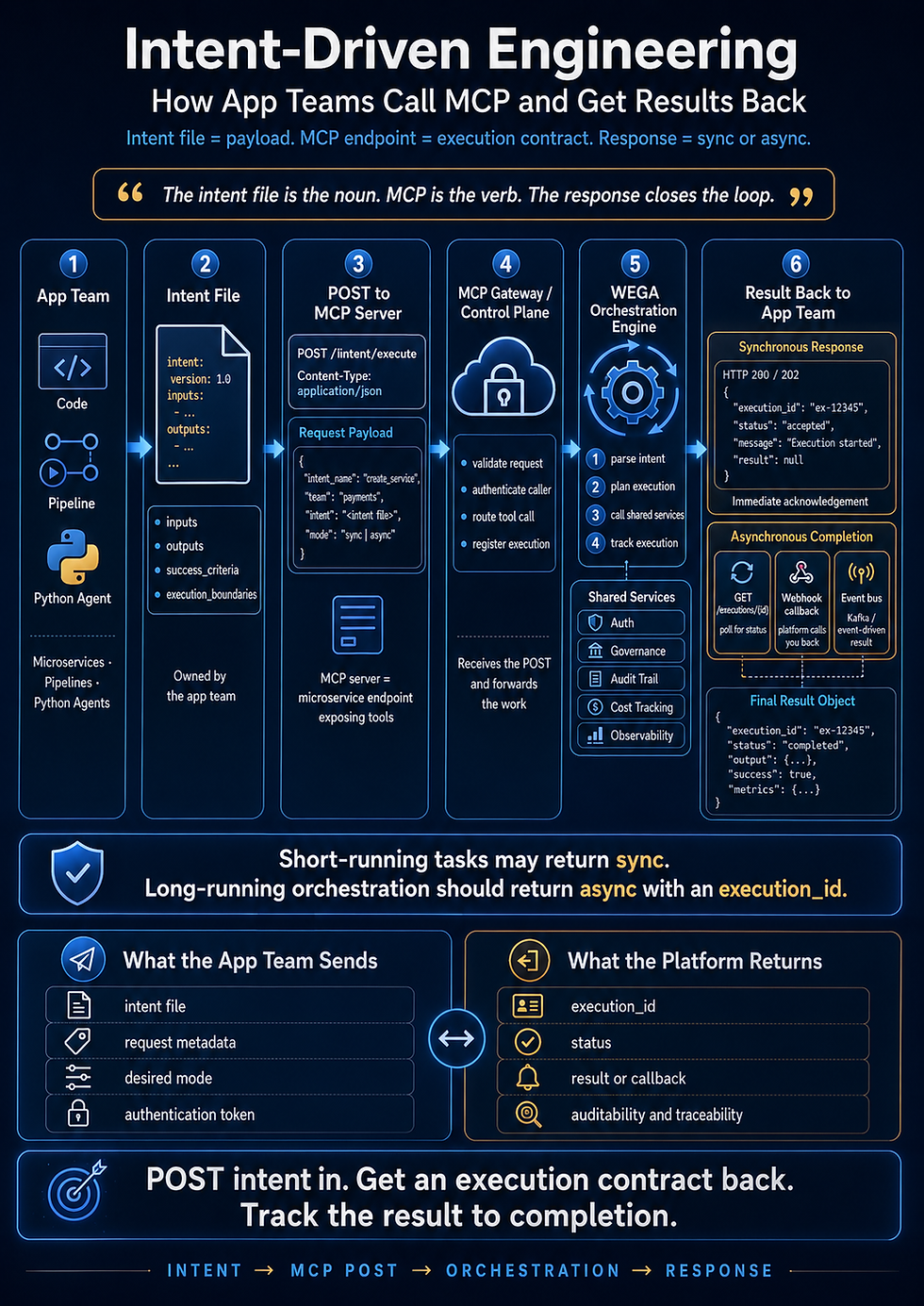
Tool Design for Intent-Driven Engineering
Intent-Driven Engineering gives us a perfect structure for tool design.
The intent file says:
What we are trying to build
Why it matters
What constraints apply
What acceptance criteria must be met
What evidence proves completion
Tools should support that lifecycle.
For example, an intent-driven toolset might include:
get_intent_file
validate_intent_completeness
get_related_architecture_context
retrieve_service_contract
run_acceptance_tests
get_pipeline_status
capture_validation_evidence
draft_completion_summary
This creates a clean flow:
Intent defines the work.
Claude plans and executes the work.
Tools retrieve context and evidence.
Humans approve important decisions.
The system captures proof.
That is the operating model.
Tool Design Should Match the Workflow
Do not design tools only around enterprise systems.
Design them around the job Claude is doing.
For feature delivery, tools may support:
Requirement retrieval
Code inspection
Test execution
Pull request drafting
Story update drafting
For production support, tools may support:
Incident lookup
Log analysis
Deployment history
Service health checks
Root cause summaries
For architecture review, tools may support:
ADR retrieval
Dependency mapping
Security policy checks
API contract comparison
Standards validation
For project governance, tools may support:
Evidence capture
Progress summaries
Risk scoring
Readiness checks
Executive reporting
Each workflow needs different tools.
The architect should not create a random toolbox.
The architect should create a capability model.
A Practical Tool Design Checklist
When designing a tool for Claude, ask these questions:
What specific job does this tool help Claude perform?
Is the tool name clear?
Is the tool description specific enough?
Are the inputs structured and validated?
Is the output structured and easy to reason over?
Does the tool return only relevant context?
Is this a read tool or a write tool?
Does it require human approval?
Is the tool call logged?
Can we trace the output back to the source system?
What happens if the tool fails?
What happens if the tool returns incomplete or stale data?
Are permissions enforced?
Is sensitive data protected?
Can the result be used as evidence?
That is an architect-level checklist.
It is not just coding.
It is AI system design.
The Most Common Tool Design Mistakes
There are several mistakes architects should avoid.
Mistake 1: Tools That Are Too Broad
A tool like search_company_data sounds useful, but it may return too much irrelevant or sensitive information.
Better tools are scoped to specific tasks.
Mistake 2: Weak Descriptions
If the tool description is vague, Claude may call it at the wrong time or misunderstand the result.
Mistake 3: Unstructured Output
Messy output leads to messy reasoning.
Structured output improves reliability.
Mistake 4: Too Much Write Access
Giving Claude direct write access too early can create operational risk.
Use draft, preview, and approval patterns.
Mistake 5: No Error Handling
Tools fail. Systems are unavailable. Results are incomplete.
Claude needs clear error messages and fallback options.
Mistake 6: No Audit Trail
If Claude uses a tool to make a recommendation, the enterprise should know which tool was called, what it returned, and what Claude did with that information.
Without auditability, trust breaks down.
A Simple Example: Designing a Jira Story Tool
A weak tool:
search_jira(query)
A better tool:
get_jira_story(story_id)
A strong enterprise-ready tool:
get_delivery_story_context(story_id)
Description:
Use this tool before planning or implementing a Jira story. It retrieves the story title, business goal, description, acceptance criteria, linked design documents, related services, dependencies, priority, current status, and source links. It does not update Jira.
Inputs:
story_id
include_linked_documents
include_related_issues
Outputs:
story_id
title
business_goal
description
acceptance_criteria
linked_documents
related_services
dependencies
status
last_updated
source_links
warnings
That is much better.
Claude receives exactly what it needs to plan work.
The enterprise knows exactly what was retrieved.
The tool does not perform risky writes.
That is strong architecture.
A Simple Example: Designing a Deployment Tool
A weak tool:
deploy(service)
That is dangerous.
A better tool:
get_deployment_readiness(service_name, environment)
This allows Claude to evaluate whether deployment is safe without actually deploying.
A stronger workflow might include three tools:
get_deployment_readiness
draft_deployment_recommendation
request_human_deployment_approval
Only after approval would an existing CI/CD system handle deployment.
This is the safer pattern:
Claude informs and prepares. The enterprise release process executes.
That makes Claude valuable without bypassing governance.
Tool Design and Human-in-the-Loop Architecture
Human-in-the-loop does not mean Claude is weak.
It means the system is designed responsibly.
Claude can still do a tremendous amount of work:
Gather context
Analyze options
Create a plan
Write code
Generate tests
Compare results
Produce summaries
Draft updates
Recommend decisions
But humans should remain in control of high-impact actions.
Especially actions involving:
Production systems
Security changes
Financial transactions
Customer communications
Legal commitments
Data deletion
Access permissions
Infrastructure changes
The architect decides where human approval is required.
That is part of the operating model.
Tool Design and Reliability
Reliability is not only about whether Claude gives a good answer.
Reliability is about whether the whole system behaves predictably.
Good tool design improves reliability because it gives Claude:
Clear capabilities
Clean inputs
Relevant context
Structured outputs
Error boundaries
Traceable evidence
Safe action paths
A reliable Claude system does not depend on luck.
It depends on design.
That is why tool design belongs in the certification conversation.
What the Exam Wants You to Understand
For the Claude Certified Architect exam, you should understand that tool design is a core architectural skill.
You should be able to explain:
Why tools should be specific and well-described
Why inputs and outputs should be structured
Why tool scope matters
Why read and write tools require different controls
Why tool results should be traceable
Why tools should support workflows, not just systems
Why human approval is important for sensitive actions
Why tool design directly affects Claude’s reliability
The exam is not just asking whether Claude can use tools.
It is asking whether you understand how to design tool-using systems.
That is the difference.
Final Thought
Claude is powerful.
MCP makes Claude connected.
But tool design makes Claude usable in the enterprise.
The architect’s job is to shape the tool environment so Claude can do meaningful work safely.
A strong tool gives Claude just enough capability, just enough context, and just enough structure to make good decisions.
A weak tool gives Claude confusion, risk, and too many ways to go wrong.
So as you prepare for certification, remember this:
Tool design is not plumbing. Tool design is architecture.
It is how we turn AI from a smart assistant into a reliable participant in enterprise delivery.
That is the level of thinking required from a Claude Certified Architect.
:::
For Article #10, I’d go straight into structured output and evidence capture — how Claude should produce plans, JSON, validation summaries, test evidence, and audit-ready results instead of loose conversational answers.
Comments