

Claude Architect Expert Mode: The 8 Advanced Patterns That Separate Builders from Architects
- Mark Kendall
- 2 days ago
- 4 min read

Claude Architect Expert Mode: The 8 Advanced Patterns That Separate Builders from Architects
If you’ve mastered Claude Code basics—CLAUDE.md, Plan Mode, Skills, Hooks, MCP, and structured outputs—you’ve reached an important milestone. But passing the Claude Architect exam and succeeding in enterprise AI requires something more.
It requires thinking like an architect.
Architects don’t simply ask Claude to generate code. They design systems that are reliable, secure, maintainable, observable, and scalable across dozens or even hundreds of repositories.
These eight advanced patterns represent the next level.
1. Multi-Agent Orchestration and Delegation
One AI agent should rarely perform every task.
Instead, architects divide work into specialized agents.
A common enterprise workflow might look like this:
Product Manager Agent
│
▼
Intent Generator
│
▼
Planning Agent
│
┌──────┴────────┐
▼ ▼
Backend Agent Frontend Agent
│
▼
Testing Agent
│
▼
Security Review Agent
│
▼
PR Agent
Each agent has one responsibility.
Instead of asking one model to “build the feature,” each agent focuses on a deterministic task.
Examples include:
Requirements analysis
API generation
React UI generation
Test generation
Documentation
Security review
Pull request creation
This dramatically improves consistency while reducing hallucinations.
2. Advanced Context Management
Large repositories overwhelm AI models if context isn’t managed carefully.
Good architects continuously manage context instead of continually expanding it.
Strategies include:
CLAUDE.md for persistent repository rules
Feature.md or Intent.md for current work
/compact to summarize previous discussions
MCP tools for retrieving documentation on demand
Short-lived working memory
Long-lived repository memory
Instead of loading an entire repository into the context window, retrieve only what is needed when it is needed.
Think retrieval—not accumulation.
3. Tool Design Tradeoffs and MCP Architecture
Enterprise AI becomes powerful when connected to enterprise systems.
Rather than hardcoding integrations, MCP provides a standardized interface.
Example architecture:
Claude Code
│
▼
MCP Client
│
┌────┼─────────────┐
▼ ▼ ▼
Jira GitHub Confluence
│
▼
Enterprise APIs
When designing tools, architects evaluate tradeoffs:
Generic versus specialized tools
Local versus remote MCP servers
Performance versus flexibility
Authentication complexity
Latency
Security boundaries
Cost
The goal isn’t “more tools.”
The goal is the smallest set of well-designed tools that solve enterprise problems.
4. Reliability Patterns
Enterprise AI cannot rely on “hopefully.”
Reliable systems include safeguards.
Examples include:
Retry Logic
If GitHub fails…
Retry.
If Jira times out…
Retry.
If MCP temporarily disconnects…
Retry with exponential backoff.
Validation
Never trust generated code automatically.
Validate:
compilation
linting
unit tests
security scans
schema validation
before merging.
Idempotency
Running the same workflow twice should produce the same result.
For example:
Generate Feature
↓
Run Implementation
↓
Create PR
Running the workflow again should update the existing pull request—not create duplicates.
5. Security and Governance
Large enterprises care as much about governance as productivity.
Architects design guardrails.
Examples include:
Least-privilege MCP permissions
Read-only production access
Secrets stored outside prompts
Audit logging
Human approval before deployment
Role-based tool permissions
Policy validation
AI should accelerate delivery—not bypass governance.
6. Complex Claude Code Workflows
Expert users combine multiple Claude capabilities.
Example workflow:
Jira Story
↓
MCP retrieves ticket
↓
Plan Mode
↓
Generate Intent
↓
Backend Agent
↓
Frontend Agent
↓
Testing Agent
↓
Hook executes validation
↓
Security scan
↓
GitHub Pull Request
↓
Human approval
↓
Deployment
Notice that Claude is only one part of the system.
The workflow is the product.
7. Performance and Token Optimization
Enterprise AI spends tokens exactly where they create value.
Optimization techniques include:
Smaller prompts
Prompt chaining
On-demand retrieval
Structured output
Reusable Skills
CLAUDE.md instead of repeated instructions
Context compaction
Parallel agents
Delta updates instead of regenerating everything
Reducing unnecessary tokens often improves quality while lowering cost.
The fastest AI system is usually the one that asks the fewest unnecessary questions.
8. Real-World Architecture
Imagine a healthcare company implementing a new claims feature.
Instead of asking Claude:
“Build the feature.”
An architect creates this workflow:
Jira story retrieved through MCP.
Confluence requirements loaded.
Figma designs imported.
Planning Agent builds implementation plan.
Backend Agent updates APIs.
Frontend Agent builds React screens.
Testing Agent generates unit tests.
Hook executes linting and security validation.
PR Agent creates pull request.
Human reviews final output.
Every step is deterministic.
Every step is repeatable.
Every step can be audited.
That is enterprise AI.
Final Thoughts
The biggest transition in AI engineering isn’t moving from coding to prompting.
It’s moving from prompting to architecture.
Great developers write excellent prompts.
Great architects design systems where prompts, tools, agents, governance, validation, and workflows operate together as a cohesive platform.
That’s the mindset the Claude Architect certification is measuring.
It’s also the mindset that will define the next generation of enterprise software delivery.
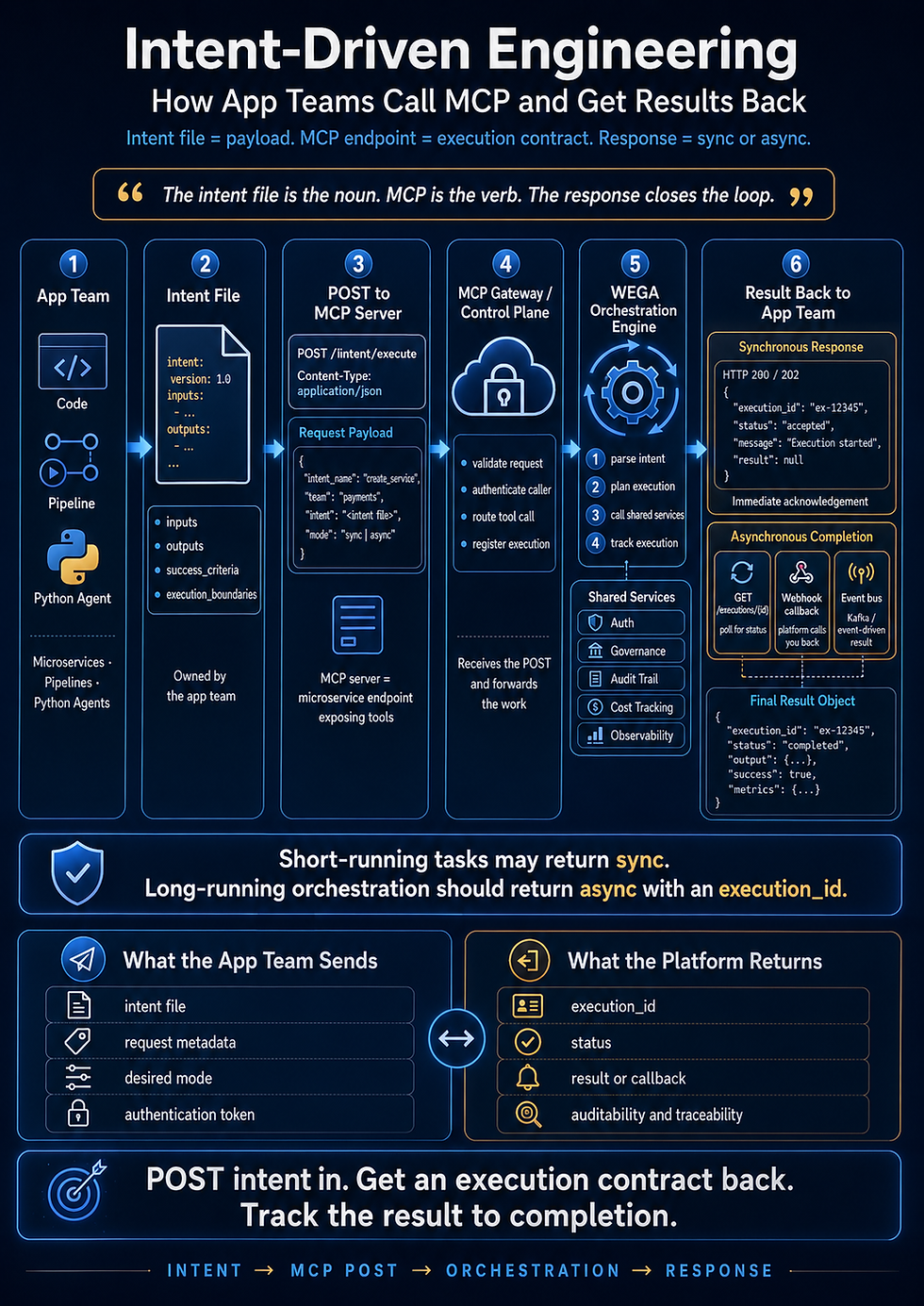
As Intent-Driven Engineering continues to evolve, these patterns become even more powerful. Intent defines what the business wants to achieve, while orchestrated agents, MCP integrations, validation pipelines, and governance determine how that intent is delivered safely, efficiently, and repeatedly at enterprise scale.
The future of software isn’t just AI-assisted development.
It’s architecting intelligent delivery systems that can transform intent into production-ready software with confidence.
Comments