
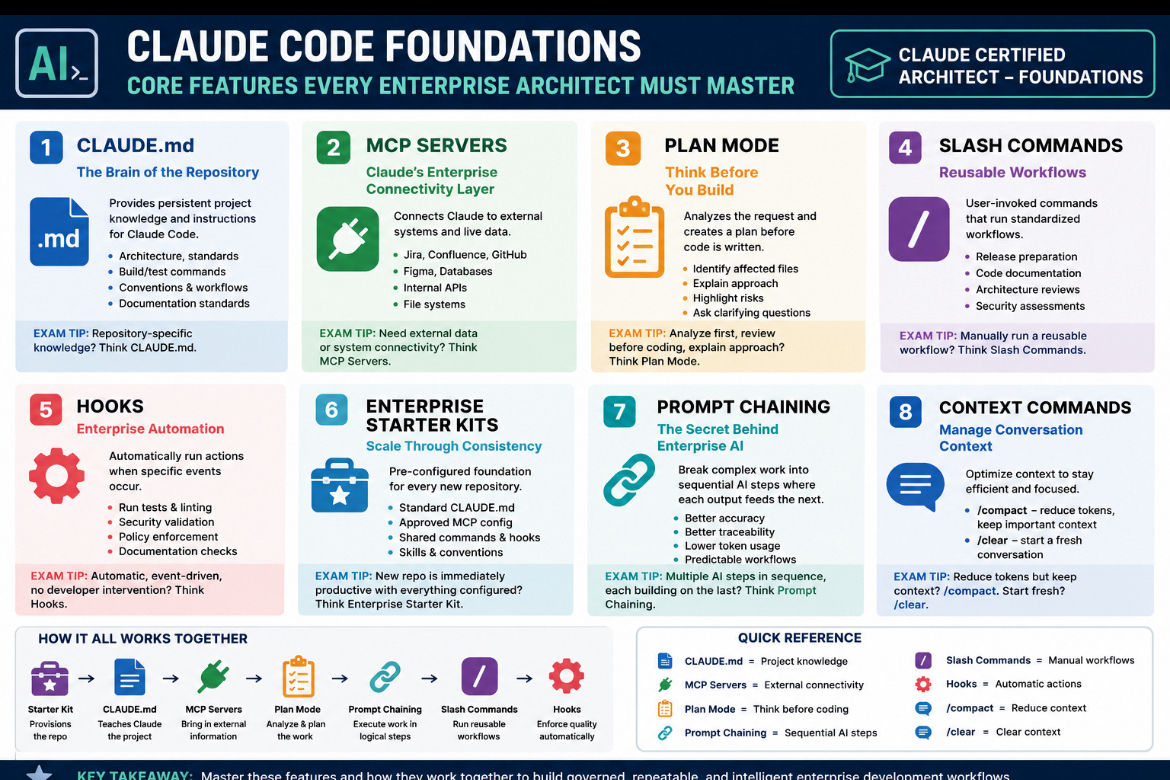
Claude Code Foundations: The Core Features Every Enterprise Architect Must Master
- Mark Kendall
- 1 day ago
- 3 min read

Claude Code Foundations: The Core Features Every Enterprise Architect Must Master
If you’re preparing for the Claude Certified Architect – Foundations exam, it’s easy to become overwhelmed by the terminology. Hooks, Slash Commands, MCP Servers, Plan Mode, Prompt Chaining, Skills—the names can blur together.
The key is to stop memorizing features and start understanding why each one exists. Every feature solves a different enterprise problem. Once you understand that purpose, the exam becomes much easier.
1. CLAUDE.md — The Brain of the Repository
Every successful project needs permanent instructions. Instead of repeating coding standards and architecture decisions in every prompt, Claude Code reads them directly from the repository.
A good CLAUDE.md typically contains:
Project architecture
Coding standards
Build and test commands
Repository conventions
Team workflows
Documentation standards
Think of it as onboarding every new developer—and every Claude session—automatically.
Exam Tip: If the question mentions repository-specific knowledge, the answer is almost always CLAUDE.md.
2. MCP Servers — Claude’s Enterprise Connectivity Layer
Claude becomes dramatically more powerful when it can retrieve live information instead of relying only on prompts.
MCP Servers provide secure access to systems such as:
Jira
Confluence
GitHub
Figma
Databases
Internal APIs
File systems
Instead of copying a Jira story into a prompt, Claude retrieves it directly.
Exam Tip: Whenever the scenario mentions connecting to enterprise systems or retrieving external information, think MCP Servers.
3. Plan Mode — Think Before You Build
One of the biggest productivity improvements in Claude Code is planning before implementation.
Plan Mode allows Claude to:
Analyze requirements
Identify affected files
Explain the implementation strategy
Highlight risks
Ask clarifying questions
Only after the developer approves the plan does coding begin.
Experienced architects know that preventing mistakes is usually faster than fixing them later.
Exam Tip: If the question says analyze first, review before coding, or explain the approach, the answer is Plan Mode.
4. Slash Commands — Reusable Workflows
Organizations repeat the same workflows every day.
Examples include:
Release preparation
Security reviews
Code documentation
Architecture reviews
Production readiness checks
Rather than typing long prompts repeatedly, developers invoke a simple command such as:
/release
or
/architecture-review
One command can execute an entire standardized workflow.
Exam Tip: If a developer manually starts a reusable workflow, think Slash Commands.
5. Hooks — Enterprise Automation
Hooks remove human error.
Instead of depending on developers to remember every validation step, Hooks execute automatically whenever configured events occur.
Typical Hook automation includes:
Running tests
Formatting code
Security validation
Policy enforcement
Documentation verification
Hooks provide governance without slowing developers down.
Exam Tip: If the scenario says automatically, without developer intervention, or enforce every time, the answer is usually Hooks.
6. Enterprise Starter Kits — Scale Through Consistency
Enterprise AI adoption isn’t about creating one great repository.
It’s about creating one thousand great repositories.
Starter Kits package everything together:
Standard CLAUDE.md
Approved MCP configuration
Shared Slash Commands
Standard Hooks
Organization Skills
Repository conventions
Security defaults
Every new project begins with the same enterprise-approved foundation.
This dramatically reduces onboarding time while improving governance.
Exam Tip: If the scenario describes a new repository that is immediately productive because everything is already configured, the answer is Enterprise Starter Kit.
7. Prompt Chaining — The Secret Behind Enterprise AI
This is the concept many candidates underestimate.
Prompt Chaining breaks complex work into smaller, deterministic stages instead of asking Claude to solve everything with one enormous prompt.
A typical enterprise chain might look like this:
Analyze the Jira story.
Retrieve related Confluence documentation.
Review existing source code.
Create an implementation plan.
Generate the code.
Execute automated tests.
Produce documentation.
Prepare the pull request.
Each step builds on the previous one.
The result is:
Better accuracy
Better traceability
Lower token usage
Easier debugging
More predictable enterprise workflows
Prompt Chaining is one of the architectural foundations of modern AI development because it mirrors how experienced engineers solve problems: one logical step at a time.
Exam Tip: If the scenario involves multiple sequential AI steps where the output of one stage becomes the input of the next, think Prompt Chaining.
Bringing Everything Together
The real power of Claude Code comes from combining these capabilities into a single workflow.
Imagine this sequence:
An Enterprise Starter Kit provisions the repository.
CLAUDE.md teaches Claude how the project works.
MCP Servers retrieve the Jira story and design documents.
Plan Mode analyzes the implementation.
Prompt Chaining orchestrates each development phase.
Slash Commands execute reusable engineering workflows.
Hooks automatically enforce quality before every pull request.
This is no longer just AI-assisted coding.
It is an enterprise software delivery platform built around repeatable, governed, and intelligent development.
For architects, that is the mindset the Claude Certified Architect exam is designed to evaluate.
I like the direction your studying is taking.
Comments