
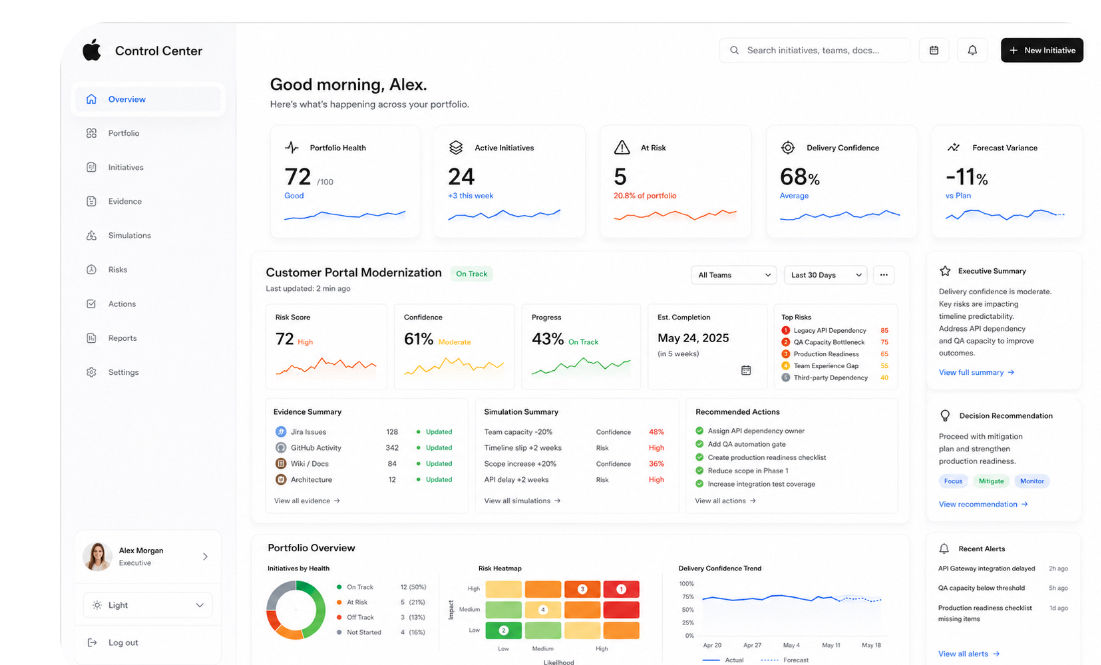
Control Center Build Path
- Mark Kendall
- 3 minutes ago
- 3 min read

Build it like this:
Control Center Build Path
Build it like this:
Control Center Build Path
1. Start with one decision
Do not start with agents.
Start with the executive question:
“Is this initiative likely to succeed, and what should we do next?”
Everything supports that.
2. Core flow
Intent
↓
Evidence
↓
Simulation
↓
Risk Score
↓
Decision Recommendation
↓
Execution Actions
That is the product.
3. MVP screens
Build only these first:
1. Portfolio Dashboard
2. Initiative Detail
3. Evidence Timeline
4. Simulation Results
5. Recommended Actions
4. Backend domains
/project
/intent
/evidence
/simulation
/risk
/recommendation
/action
These become your API boundaries.
5. First data sources
Use mock files first, then real integrations:
Phase 1: Mock Jira, GitHub, Wiki
Phase 2: Real Jira API
Phase 3: Real GitHub API
Phase 4: Confluence/Wiki
Phase 5: Cloud cost + observability data
6. Agent model
Agents should not be the architecture.
They are workers inside the control center.
Planner Agent
Evidence Agent
Risk Agent
Simulation Agent
Decision Agent
Summary Agent
Skills are the tools:
Jira Reader
GitHub Reader
Wiki Reader
Cost Estimator
Dependency Mapper
Risk Calculator
7. AWS reference architecture
React Dashboard
↓
CloudFront + S3
↓
API Gateway
↓
FastAPI on ECS Fargate
↓
DynamoDB / S3
↓
Bedrock
↓
CloudWatch / OpenTelemetry
Start with FastAPI + mock data + Docker.
Deploy later.
8. First working feature
Build this first:
POST /intent/analyze
Input:
{
"projectName": "Customer Portal Modernization",
"timelineWeeks": 12,
"teamSize": 5,
"knownRisks": ["legacy APIs", "QA bottleneck"]
}
Output:
{
"riskScore": 72,
"confidenceScore": 61,
"topRisks": ["legacy API dependency", "QA bottleneck"],
"recommendations": [
"Assign API owner",
"Add QA automation gate",
"Create production readiness checklist"
]
}
9. What makes it different
A normal AI app says:
“Ask me questions.”
Your control center says:
“Here is the predicted outcome, evidence, risk, and recommended decision.”
That is the category.
Intent → Simulation → Evidence → Decision → Execution.
1. Start with one decision
Do not start with agents.
Start with the executive question:
“Is this initiative likely to succeed, and what should we do next?”
Everything supports that.
2. Core flow
Intent
↓
Evidence
↓
Simulation
↓
Risk Score
↓
Decision Recommendation
↓
Execution Actions
That is the product.
3. MVP screens
Build only these first:
1. Portfolio Dashboard
2. Initiative Detail
3. Evidence Timeline
4. Simulation Results
5. Recommended Actions
4. Backend domains
/project
/intent
/evidence
/simulation
/risk
/recommendation
/action
These become your API boundaries.
5. First data sources
Use mock files first, then real integrations:
Phase 1: Mock Jira, GitHub, Wiki
Phase 2: Real Jira API
Phase 3: Real GitHub API
Phase 4: Confluence/Wiki
Phase 5: Cloud cost + observability data
6. Agent model
Agents should not be the architecture.
They are workers inside the control center.
Planner Agent
Evidence Agent
Risk Agent
Simulation Agent
Decision Agent
Summary Agent
Skills are the tools:
Jira Reader
GitHub Reader
Wiki Reader
Cost Estimator
Dependency Mapper
Risk Calculator
7. AWS reference architecture
React Dashboard
↓
CloudFront + S3
↓
API Gateway
↓
FastAPI on ECS Fargate
↓
DynamoDB / S3
↓
Bedrock
↓
CloudWatch / OpenTelemetry
Start with FastAPI + mock data + Docker.
Deploy later.
8. First working feature
Build this first:
POST /intent/analyze
Input:
{
"projectName": "Customer Portal Modernization",
"timelineWeeks": 12,
"teamSize": 5,
"knownRisks": ["legacy APIs", "QA bottleneck"]
}
Output:
{
"riskScore": 72,
"confidenceScore": 61,
"topRisks": ["legacy API dependency", "QA bottleneck"],
"recommendations": [
"Assign API owner",
"Add QA automation gate",
"Create production readiness checklist"
]
}
9. What makes it different
A normal AI app says:
“Ask me questions.”
Your control center says:
“Here is the predicted outcome, evidence, risk, and recommended decision.”
That is the category.
Intent → Simulation → Evidence → Decision → Execution.
Comments